


Commented VOZ on the reel? Here is the official Voicebox download and the walkthrough to hear text in your own voice. Then you can dictate into other apps and have Claude Code announce when it finishes a task.
Voicebox is a free, open-source voice studio that runs on your computer. It combines voice cloning, text-to-speech, dictation and an MCP connection for AI agents. The idea is to bring tasks people use ElevenLabs and Wispr Flow for into one local app; quality and speed depend on your model and hardware.
Checked September 26, 2026: stable version v0.5.0. All figures, prices, requirements and shortcuts below refer to this snapshot. The local app needs no account.
Install first
Mac: open Apple menu → About This Mac to check whether you have an Apple chip or Intel processor. Download the DMG for Apple Silicon or Intel, open it and drag Voicebox to Applications. Launch it and wait for the server indicator at the bottom left to turn green. The server is bundled; you do not need to install Python.
Windows: download the official installer, run the MSI or setup.exe, and follow the wizard. Open Voicebox. With a compatible NVIDIA GPU, the app can download its CUDA server to speed up generation.
Linux or Docker: this version has no prebuilt Linux app. Follow the source build guide, or install Git and Docker Compose and run:
git clone https://github.com/jamiepine/voicebox.git && cd voicebox && docker compose up --buildOpen http://localhost:17600. The current Compose file exposes that port on your computer only; 17493 is the container's internal port and the desktop app's port. Docker provides a server and web UI, without the desktop global shortcut. It builds the image locally. AMD has a docker-compose.rocm.yml overlay; NVIDIA needs Container Toolkit and suitable GPU configuration—the default Compose service uses CPU.
Clone your voice and hear the first sentence
- Open Voices → Create Voice. Some screens/docs call this Profiles → New Profile. Choose a cloned voice.
- In Record, allow microphone access and record 10–30 seconds of natural speech without music or other speakers. Avoid clips under 5 seconds. Upload accepts your existing recording; System Audio captures computer audio, always with consent.
- Fill Reference Text with the exact words spoken. Name the profile My voice, select your recording's Language (Portuguese for the reel's example), then Create Profile.
- In Generate, select your profile and Qwen3-TTS 1.7B, a good starting point for Portuguese as well as English. Choose the output language and type: “Hello! This is my voice, generated on my computer.”
- Click Generate, wait for the initial model download, and play the audio. Later generations reuse the downloaded model.
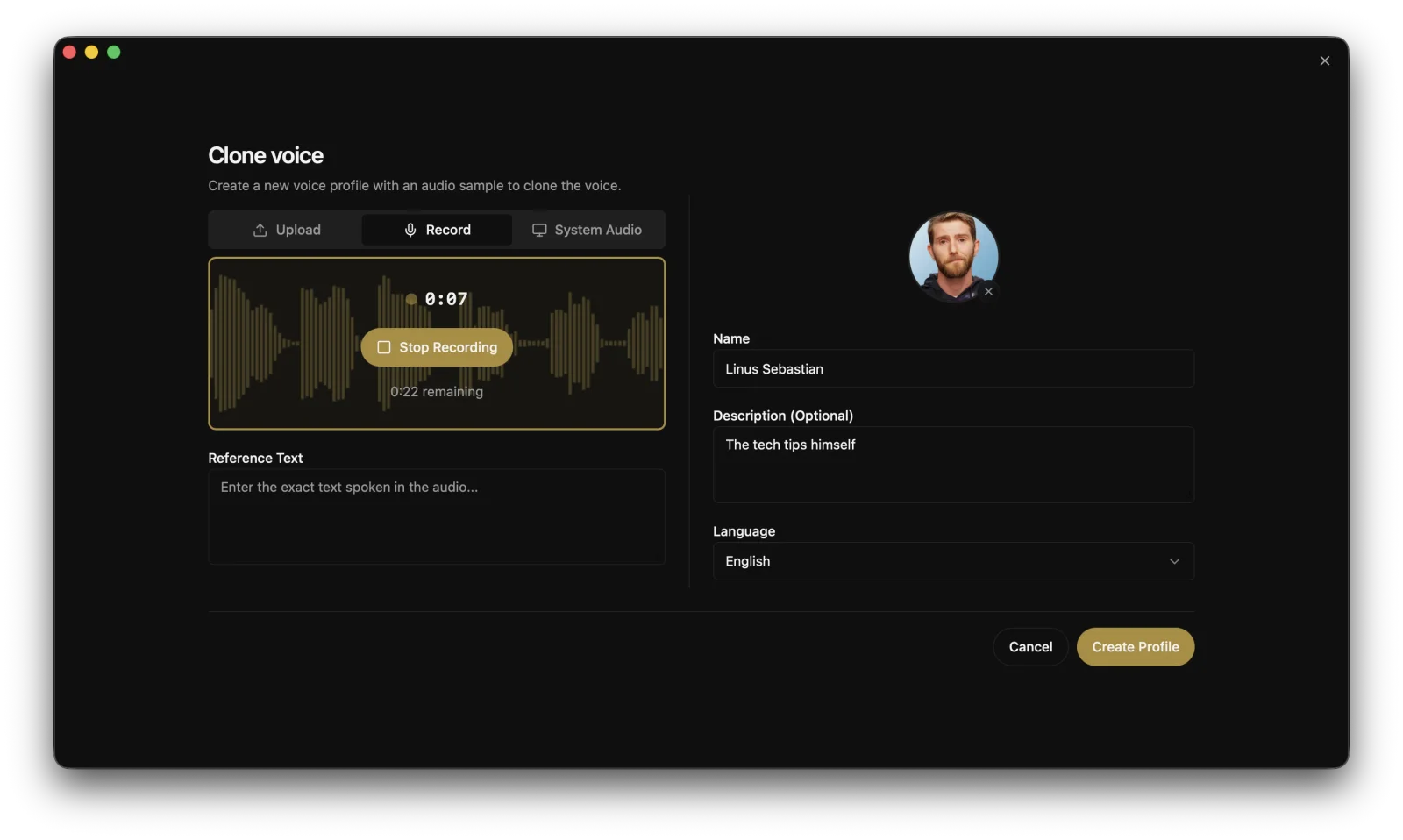
Official Voicebox project screenshot: creating a voice while recording. Control names may differ between versions.
Doesn't sound like you? Check Reference Text, record again somewhere quiet, and add more samples from the same person. Start with a short sentence. The interface accepts up to 50,000 characters, automatically split into chunks, but longer speech still takes time to generate.
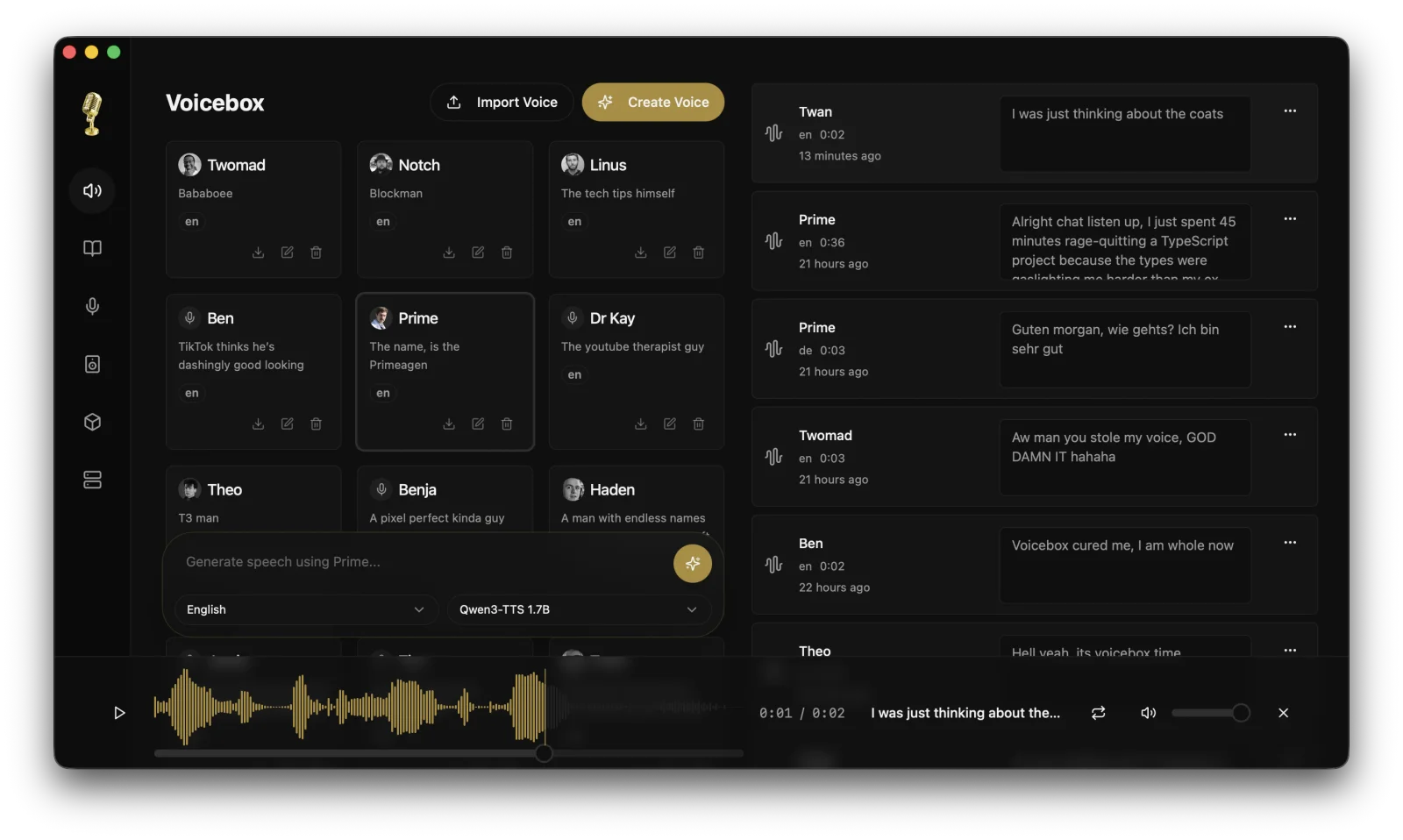
Official Voicebox project screenshot: voice profiles and speech generation.
For a language outside Qwen's supported set, choose Chatterbox Multilingual.
That's the result promised in the reel. The next steps are optional.
Optional: dictation
Keep Voicebox open. In Settings → Captures → Transcription, choose and download a Whisper model (Base, Small, Medium, Large or Turbo). Lock the language if automatic detection gets it wrong. Enable dictation and auto-paste in Settings → Captures → Dictation.
On Mac, grant Microphone, Accessibility and Input Monitoring permissions in Privacy & Security when prompted. Accessibility enables pasting; Input Monitoring lets the app detect the shortcut.
- Click a text field in another app.
- Hold Right ⌘ + Right ⌥ on Mac, or Right Ctrl + Right Shift on Windows.
- Speak and release. Whisper transcribes locally, then pastes into the field that was focused when you started.
For hands-free recording, tap Space while holding the shortcut, then release; tap the shortcut again to stop. Rebind the keys in Settings → Captures → Dictation.
Optional cleanup in Settings → Captures → Refinement uses a local model, Qwen3 0.6B by default, to remove fillers and self-corrections. Review names, numbers and technical terms before sending.
Recorded but didn't paste? Open Captures and copy the transcript. Check Accessibility permission and auto-paste. Starting inside Voicebox itself, or without a focused text field, can also leave the transcript in Captures only. On Windows, an elevated window can block paste from a non-elevated app.
The dictation docs and changelog record Windows support in v0.5.0, although the README roadmap still lists Windows paste as upcoming. Linux has no global dictation in this release. Official dictation guide.
Optional: connect your agent
You need Claude Code installed, Voicebox running, and a voice profile already created. MCP lets the agent call Voicebox tools. Connecting does not turn on notifications automatically: the agent must call voicebox.speak, or you configure a separate hook.
Run this inside the project where you use Claude Code:
claude mcp add --transport http voicebox http://127.0.0.1:17493/mcp --header "X-Voicebox-Client-Id: claude-code"Restart Claude Code, check /mcp, and ask it to list voices with voicebox.list_profiles. In Voicebox → Settings → MCP, bind claude-code to My voice, select Qwen, and disable personality rewriting to preserve the exact text.
Ask Claude Code:
Use voicebox.speak to say “Task complete.” with language set to en and personality set to false, using the voice bound to this client.
For the reel's Portuguese phrase, use “Tarefa concluída.” with language="pt". After testing, add this to the project's CLAUDE.md:
When you finish a task, call voicebox.speak with a one-sentence summary in English, language="en" and personality=false. Use the voice bound to this client. If Voicebox is unavailable, report that without retrying indefinitely.
Voicebox also exposes voicebox.transcribe and voicebox.list_captures. The connection is local, but Claude Code still uses your chosen provider and plan. Local voice processing does not make the entire agent offline.
Advanced: hooks and other clients
Alternative: a Stop hook on Mac
This example belongs to this guide, not Voicebox's official recipes. The command and request were checked; actual playback was not tested here because the app was not installed. With your client bound to a voice, test this first:
curl --fail --silent --show-error --max-time 10 -X POST http://127.0.0.1:17493/speak -H 'Content-Type: application/json' -H 'X-Voicebox-Client-Id: claude-code' -d '{"text":"Task complete.","language":"en","personality":false}'The server returns a generation in progress: an accepted response does not prove audio has played. Confirm you hear the sentence. Only then merge this into .claude/settings.json, preserving existing settings:
{
  "hooks": {
    "Stop": [
      {
        "hooks": [
          {
            "type": "command",
            "command": "curl --fail --silent --show-error --max-time 10 -X POST http://127.0.0.1:17493/speak -H 'Content-Type: application/json' -H 'X-Voicebox-Client-Id: claude-code' -d '{\"text\":\"Task complete.\",\"language\":\"en\",\"personality\":false}' >/dev/null",
            "timeout": 15
          }
        ]
      }
    ]
  }
}
Stop fires when Claude finishes a response; it does not certify task success. Use the hook or the CLAUDE.md instruction to avoid duplicate notifications. Claude Code hooks reference.
What about Codex?
Codex accepts HTTP MCP servers. The local CLI recognized this configuration, but Voicebox speech was not tested end to end. Voicebox's docs do not cover Codex: treat this as a configuration to try, not a verified integration.
Merge into ~/.codex/config.toml:
[mcp_servers.voicebox]
url = "http://127.0.0.1:17493/mcp"
http_headers = { "X-Voicebox-Client-Id" = "codex" }
Restart Codex, ask it to list profiles, and bind codex to your voice in Settings → MCP. Test voicebox.speak with language="en" (or pt for Portuguese). If it works, add the same completion instruction to the project's AGENTS.md. Codex MCP documentation.
Other clients and debugging
For Cursor, add this to its MCP configuration, usually .cursor/mcp.json. In Windsurf/Cascade, use Open MCP config file in settings: the location varies between versions.
{
  "mcpServers": {
    "voicebox": {
      "url": "http://127.0.0.1:17493/mcp",
      "headers": { "X-Voicebox-Client-Id": "cursor" }
    }
  }
}
VS Code uses a different structure in .vscode/mcp.json:
{
  "servers": {
    "voicebox": {
      "type": "http",
      "url": "http://127.0.0.1:17493/mcp",
      "headers": { "X-Voicebox-Client-Id": "vscode" }
    }
  }
}
For stdio-only clients, the documented executable is /Applications/Voicebox.app/Contents/MacOS/voicebox-mcp on Mac or C:\Program Files\Voicebox\voicebox-mcp.exe on Windows. Set the VOICEBOX_CLIENT_ID environment variable to identify the client. Full Voicebox configuration.
To diagnose a connection, keep the app open and run:
npx @modelcontextprotocol/inspector http://127.0.0.1:17493/mcpStart with voicebox.list_profiles, then voicebox.speak. If no voice resolves, bind the client in Settings → MCP or pass the profile name explicitly. Keep the server on 127.0.0.1; this version has no authentication for exposing it to the internet.
Languages: Portuguese and 22 more
As of September 26, 2026, there are 23 languages across 7 engines. Only Chatterbox Multilingual covers all of them. Qwen3-TTS, Qwen CustomVoice and TADA 3B offer 10; Kokoro offers 8; LuxTTS and Chatterbox Turbo are English-only. TADA 1B is also English-focused. Kokoro and Qwen CustomVoice use preset voices, not your cloned voice.
The full list: Arabic, Chinese, Danish, Dutch, English, Finnish, French, German, Greek, Hebrew, Hindi, Italian, Japanese, Korean, Malay, Norwegian, Polish, Portuguese, Russian, Spanish, Swahili, Swedish and Turkish. Language support in the source.
What does it cost, and what stays local?
Prices checked September 26, 2026, in US dollars: local Voicebox is free, with no account. Optional cloud backup/sync is still advertised as coming soon, starting at US$12/year, subject to change. Wispr Flow Pro advertises US$15/user/month; Free allows 2,000 words/week on desktop. The comparison also shows US$12/user/month; check the billing period before subscribing. ElevenLabs (affiliate link) includes Instant Voice Cloning starting with Starter at US$6/month; Free does not include it.
In local mode, voice processing, samples and captures stay on your computer. Internet is needed for initial model downloads; new models, updates and download checks can access the network. Sharing audio or configuring external services changes that path. Files on your disk are still sensitive.
Hardware and disk space
As of September 26, 2026, the docs require macOS 11+ or Windows 10+, 8 GB RAM minimum and recommend 16 GB or more. They list 5 GB free disk space minimum and 10 GB or more recommended; allow more for multiple models and recordings.
Approximate downloads range from 350 MB for Kokoro to 8 GB for TADA 3B; Qwen3-TTS 1.7B is about 3.5 GB. Whisper and dictation cleanup add their own models. Apple Silicon uses MLX/Metal; Windows NVIDIA can use CUDA, other Windows GPUs can use DirectML, and Linux AMD can use ROCm. CPU works more slowly. Official requirements.
Update or uninstall
Before updating, export profiles and save important audio. Use the app's updater when offered, or download the latest official installer above. Reopen and test a short sentence.
To uninstall, quit Voicebox and its server; move the app to Trash on Mac or use Settings → Apps on Windows. Data may remain in ~/Library/Application Support/sh.voicebox.app/ on Mac or %APPDATA%/sh.voicebox.app/ on Windows. Delete that folder only if you also want to remove profiles, captures and generations, after backing up. Check the models directory in settings too: a custom or shared cache can live elsewhere.
Remove the MCP server from your clients and any notification hook/instruction you added. For Docker, docker compose down stops the service while preserving volumes; keep those volumes if you want to retain your data.
Created by Jamie Pine, also the creator of Spacedrive, Voicebox is MIT-licensed. On September 26, 2026, GitHub's API reported 55,743 stars and 6,945 forks; the latest stable release was v0.5.0, published April 25, 2026. Source and releases.
Comments
Have a question or something to add? Join the conversation.
No account needed. Select Sign in and choose a name to comment.
Loading the conversation…
Comment privacyCommenting guidelines