



ECC is a free, open-source add-on (MIT licence) that turns the coding agent you already use into a small engineering team. It is not a new model and not a new app: it installs on top of Claude Code, Codex or Cursor and gives your agent specialists and routines. One agent plans the feature, a skill makes it write the tests before the code, another agent attacks your app looking for holes, and a command keeps writing tests until coverage closes. ECC was created by Affaan Mustafa and has passed 264,000 stars on GitHub in eight months, more than React and more than Linux.
Before you start
- Claude Code 2.1 or newer (
claude --version), Codex or Cursor. - Node.js 18 or newer, for
npx(node --version), and Git. - A project you can experiment on. The walkthrough below used a tiny Node API created just for this guide.
What ECC is, in plain words
ECC is a harness: the layer of instructions and automation around the model. It adds four kinds of pieces:
- Agents (68). Specialists your agent can hand work to, each with its own instructions and tools:
planner,tdd-guide,security-reviewer,code-reviewer,build-error-resolverand reviewers for Python, Go, Rust, React and more. - Skills (292). Manuals the agent reads when a task matches: test-driven development, security review, end-to-end tests, API design, and many domain packs you will never need.
- Hooks. Small scripts that run automatically before or after the agent acts: quality checks after an edit, safety checks before a shell command, a session summary when you stop.
- Rules. Always-on standards per language. The Claude plugin cannot ship these; you copy only the packs you want.
It also brings memory between sessions, continuous learning and AgentShield, a scanner for your agent's own configuration.
Be honest with yourself about the size. 68 agents and 292 skills is a lot. On the Claude Code plugin, claude plugin details ecc@ecc reports about 41,500 tokens of context added to every session. ECC's own README says to start with the workflow you need, not the full catalogue. This guide does exactly that: four commands, one per role.
Install ECC in Claude Code
In your terminal, run the guided setup:
npx ecc-universal@2.2.1 setupThe first time, npx asks to download ecc-universal; answer y. Then the wizard checks for existing installs and asks two questions:
- Where should Claude enable ecc@ecc? Global user makes it available in every project. Shared project stores it in the repository settings for your team. Private project enables it only here without committing the choice. If you are unsure, pick 1.
- How should ECC hooks run? Off, Minimal, Standard (the default) or Strict. More on this below; Standard is a fine start.
Confirm with y, then restart Claude Code or run /reload-plugins.
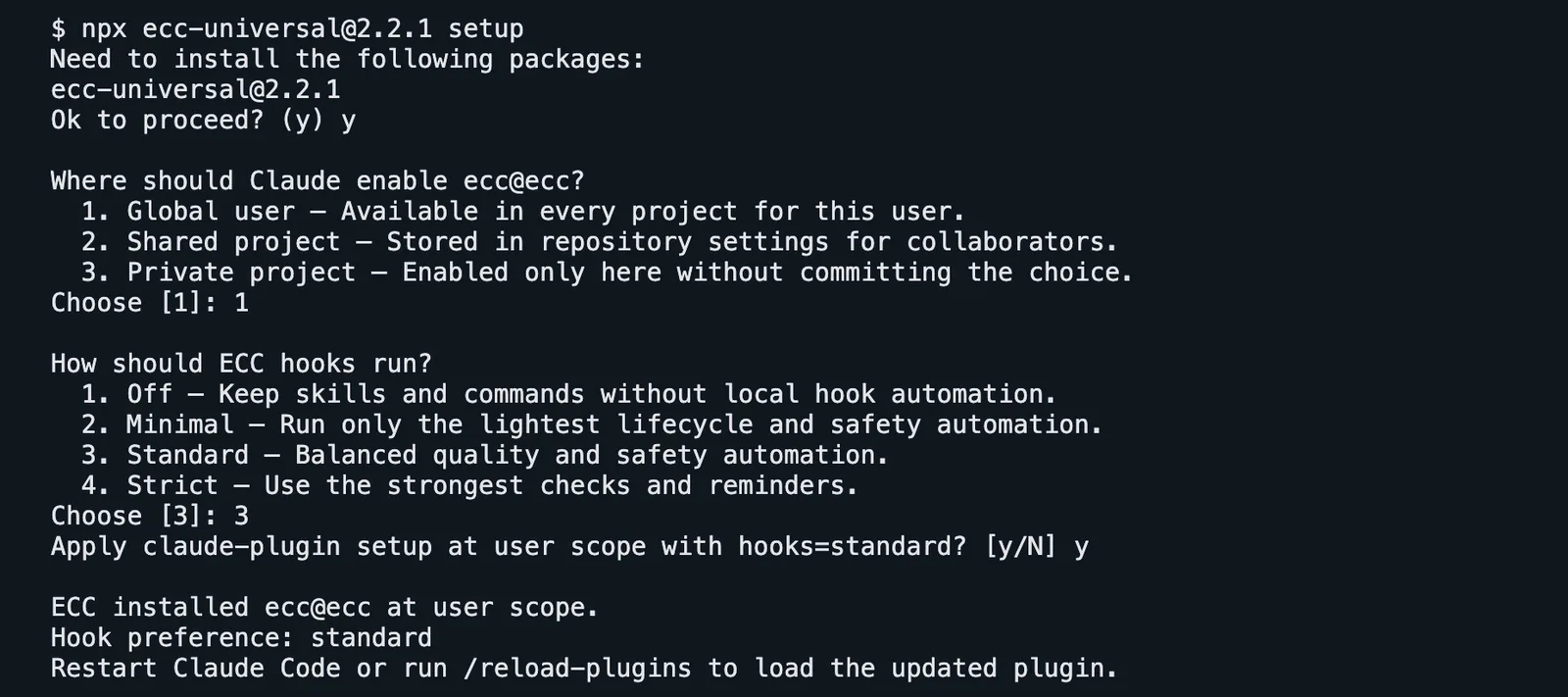
A first install on a clean machine, recorded for this guide.
Check it inside Claude Code:
/plugin list ecc@ecc
The package is 2.2.1; the plugin it installs follows the repository, 2.2.2 on the day of writing.
Why 2.2.1 and not 2.2.2? ECC's README currently shows ecc-universal@2.2.2, but that version has not been published to npm yet, so the command fails. 2.2.1 is what npm serves. If npx reports a version error, npm view ecc-universal version tells you the current one.
Prefer Claude Code's own commands? Inside Claude Code, /plugin marketplace add https://github.com/affaan-m/ECC and then /plugin install ecc@ecc install the same plugin. Pick one path. Never run ECC's ./install.sh --profile full on top of the plugin: installing twice duplicates skills and makes hooks fire twice.
Want it lighter? npx ecc-universal@2.2.1 install --profile minimal --target claude installs the rules, agents and core workflows with no hooks at all.
After installing, /ecc:configure-ecc inside Claude Code reopens the same setup as a conversation.
Install it in Codex or Cursor
Codex. ECC ships a native Codex plugin:
codex plugin marketplace add affaan-m/ECCcodex plugin add ecc@eccInside Codex, type $configure-ecc for the guided setup. Codex asks you to trust the hooks explicitly, and it does not use the four Claude hook profiles. Setting up Claude Code and Codex together? npx ecc-universal@2.2.1 install --guided configures both in one flow.
Cursor. Cursor support is a project-local adapter installed from a copy of the repository:
git clone https://github.com/affaan-m/ECC.git && cd ECC./install.sh --profile minimal --target cursorIt writes a .cursor/ folder with ECC's rules and agents (as .cursor/agents/ecc-*.md). ECC calls this adapter "capability-limited": the Claude Code plugin is the complete experience. The same --target pattern exists for Gemini CLI, Zed, OpenCode, Qwen, Kimi and others; the README lists them.
I tested the Claude Code path end to end for this guide. The Codex and Cursor commands come from ECC's README.
Plan a feature before any code
Open Claude Code in your project and describe the feature:
/ecc:plan "Let users delete their own notes: DELETE /notes/:id, only the owner can delete, 404 if the note does not exist"The planner restates what you asked, reads the code for patterns to follow, breaks the work into steps, lists the risks with a severity each, and then stops and waits for you to reply "yes" (or "modify: …"). Nothing is written before you confirm.
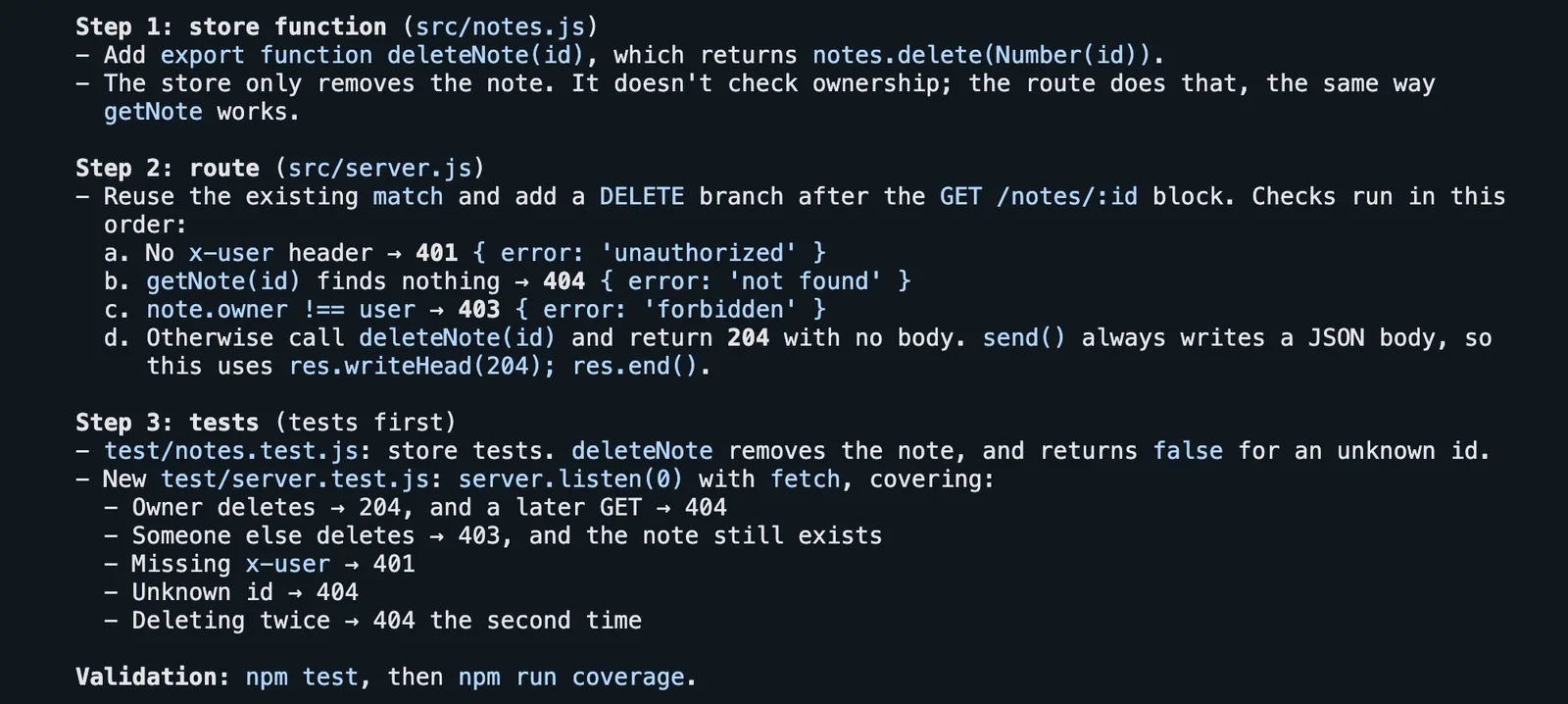
The plan for the demo API. Below it, the planner also listed four problems it found in the existing code, including a path traversal and a hardcoded admin token, before asking for confirmation.
Plugin installs use the /ecc: prefix. If you installed ECC by hand, the short form (/plan) may be what you have.
Write it with the tests first
Reply to the plan and ask for the tdd-workflow skill:
yes. Use the tdd-workflow skill: write the failing tests first, then the code.
The skill hands the work to the tdd-guide agent, which writes the tests, runs them to see them fail for the right reason, writes the smallest code that makes them pass, and aims for 80% coverage or more.
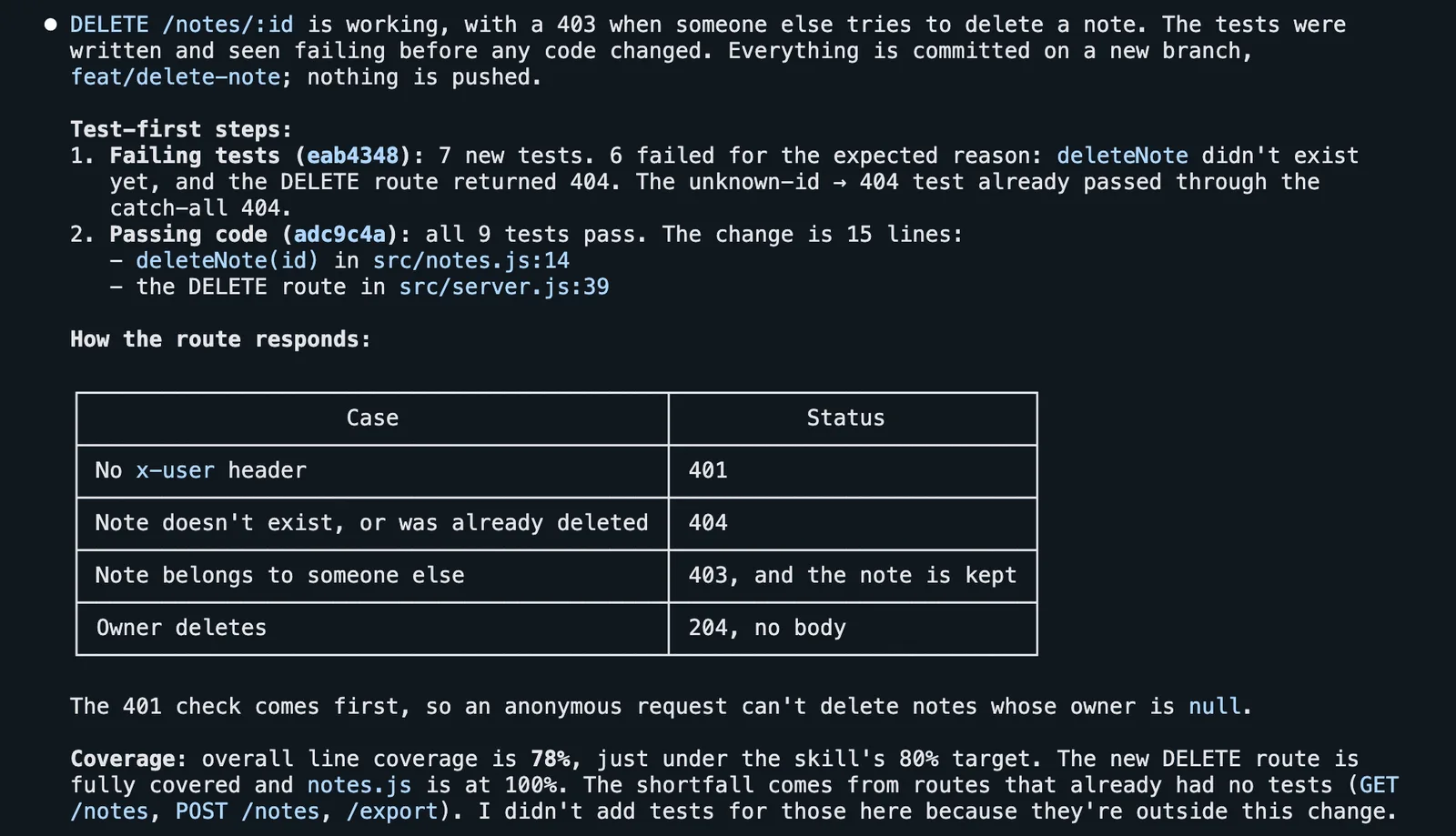
Red, then green: a failing-tests commit, then a passing-code commit, with the coverage gap explained.
Heads-up: it commits. In a Git repository the skill makes a checkpoint commit after each stage (failing tests, then passing code), and in this run it worked on a new branch. Nothing is pushed. Start from a clean working tree so those commits contain only this change.
Attack your own app, then your agent setup
This is the reel's "attacks your own app before the attacker does". Ask for the security reviewer:
Use the security-reviewer agent to review src/ for vulnerabilities. Report the findings by severity; don't change any code yet.
The security-reviewer agent looks for hardcoded secrets, injection, SSRF, unsafe crypto and the OWASP Top 10, and where it can, it proves the problem. On the demo API it sent ?file=../../../../etc/hosts to the export route and read files outside the folder.
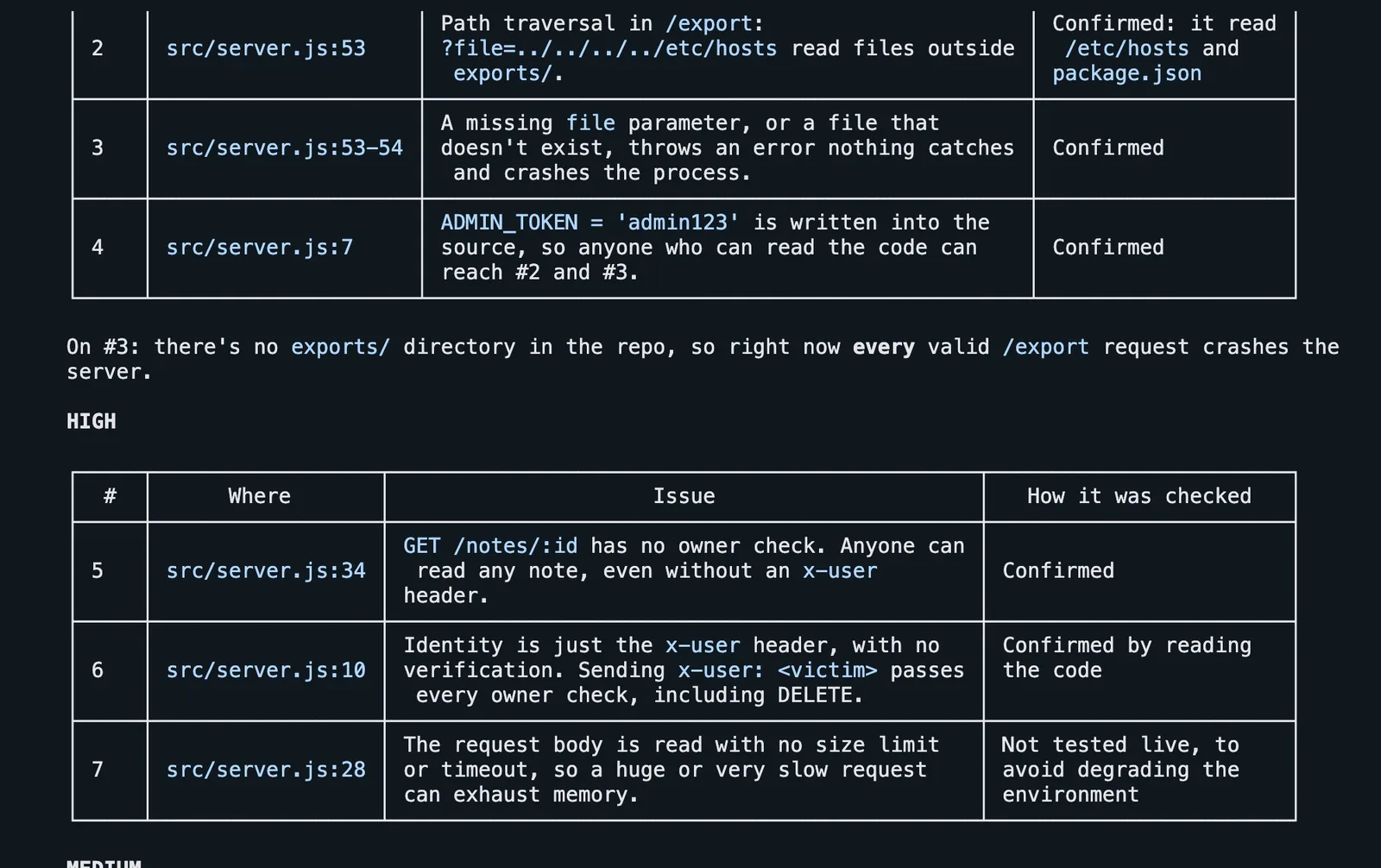
Four critical and three high findings, each with the file, the line and how it was checked. The first critical, cut off above, was a malformed JSON body crashing the server.
Then scan the agent itself:
/ecc:security-scan/security-scan runs AgentShield over your agent's configuration, not your app: permissions in .claude/settings.json, hooks, MCP servers and secrets. Your agent setup is attack surface too. In the demo it caught an API key committed in the settings file, an allow-everything Bash(*) rule with no deny list, and an MCP server installed with an unpinned @latest.
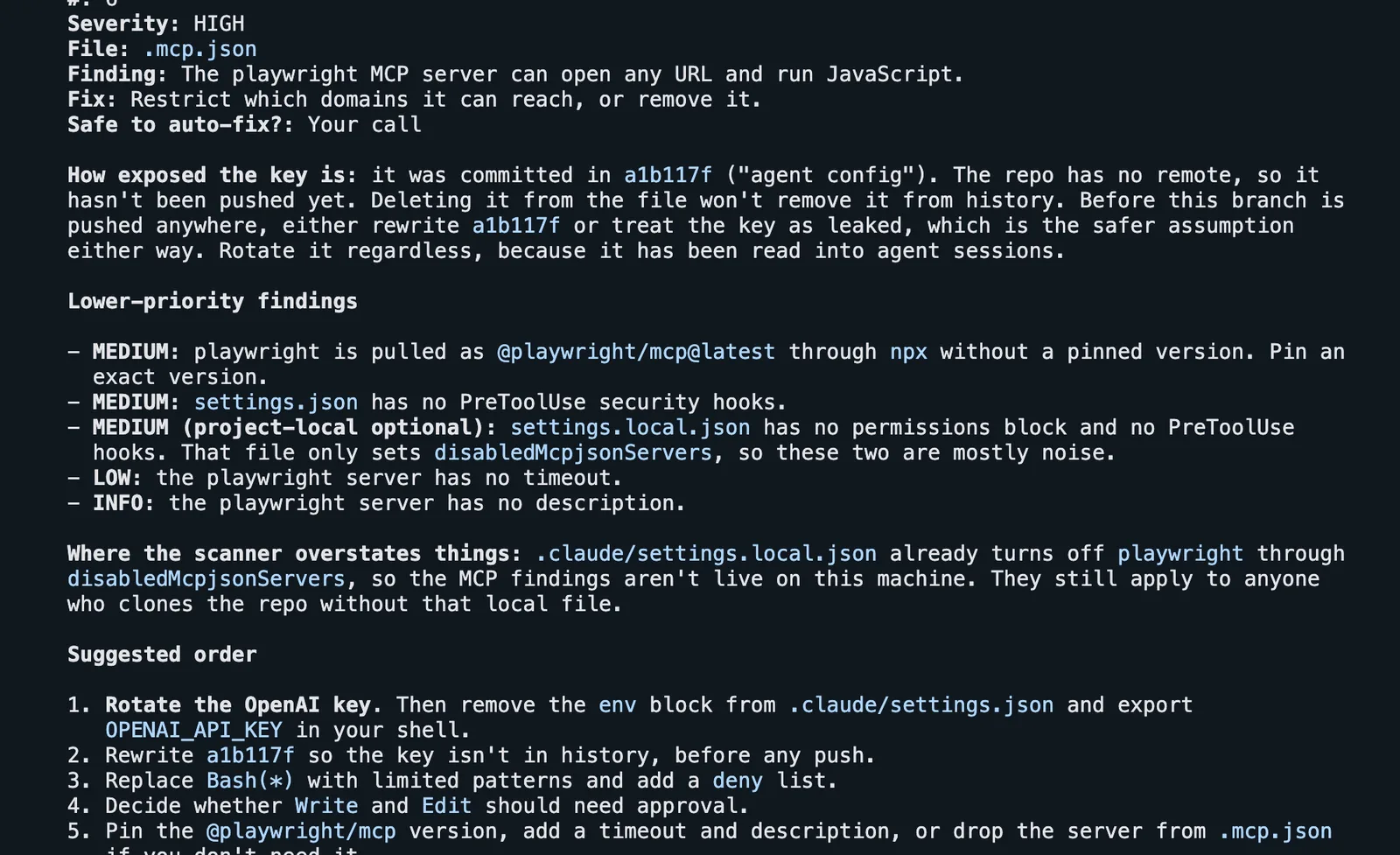
AgentShield via /ecc:security-scan. Add --fix to apply only the fixes AgentShield marks as safe.
Test until the coverage closes
/ecc:test-coverageIt runs your coverage tool, lists every file under 80%, writes the missing tests (happy path, errors, edge cases, branches), runs the whole suite again and shows a before-and-after table. For user flows in a real browser, ask for the e2e-testing skill, which drives the e2e-runner agent with Playwright.
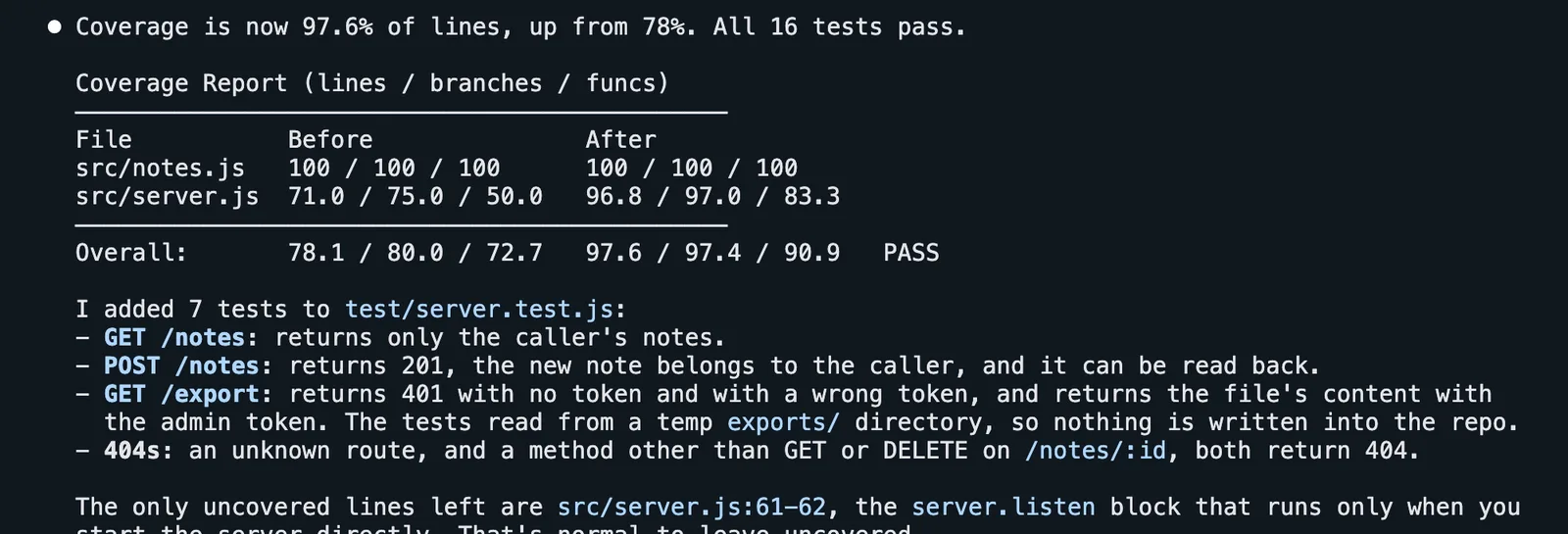
78% to 97.6% in one command. It also listed the crashing bugs it chose not to test, and committed nothing.
Other entries worth knowing: /ecc:code-review (a fresh-context review of your changes), /ecc:build-fix (fix a broken build with small diffs), /ecc:refactor-clean (remove dead code), /ecc:context-budget (see what is eating your context), and /ecc:save-session, /ecc:resume-session and /ecc:learn-eval for long work across days.
Update, tune the hooks, uninstall
Update. Run the same setup command again. It updates the plugin where it is, and it is also how you change the scope or the hook profile:
npx ecc-universal@2.2.1 setupIn Codex: codex plugin marketplace upgrade ecc, then codex plugin add ecc@ecc.
Hook profiles. Hooks are code that runs on your machine without asking, so choose on purpose:
- Minimal: only the essential lifecycle and safety hooks.
- Standard (default): quality and safety checks, including GateGuard (below).
- Strict: extra reminders and stricter guardrails.
- Off: skills and commands only, no hook automation.
ECC_HOOK_PROFILE and ECC_DISABLED_HOOKS let you override this per session without rerunning setup. The full list of hooks is in the repository's hooks/README.md.
Uninstall. For the Claude Code plugin:
claude plugin uninstall ecc@eccAdd --scope project or --scope local if you installed it there, and delete any rule folders you copied by hand. If you installed with install --profile … instead of the plugin, preview and remove from the same folder with npx ecc-universal@2.2.1 uninstall --dry-run and npx ecc-universal@2.2.1 uninstall; list-installed, doctor and repair live there too.
Common problems
- The agent stops and asks for "facts" before a command or an edit. That is GateGuard, part of the Standard and Strict profiles. Before the first shell command of a session, and the first edit or new file, it makes the agent state what you asked for and what the action will do; destructive commands (deleting folders, hard resets) are checked every time. It sounds annoying and mostly isn't: it makes the agent look before it types. To relax it,
GATEGUARD_BASH_ROUTINE_DISABLED=1skips the routine shell check,GATEGUARD_EXEMPT_GLOBSskips paths such as**/tests/**, andECC_GATEGUARD=offturns it off for the session. The Minimal profile doesn't include it. npx ecc-universal@2.2.2fails with E404. That version isn't on npm yet. Use@2.2.1, or check the current one withnpm view ecc-universal version.npx ecc-installdoesn't work.ecc-installis a program insideecc-universal, not a package of its own. Use thenpx ecc-universal@…commands above.- Skills appear twice or hooks fire twice. You stacked two install methods. Uninstall the plugin, run the
uninstall --dry-runcommand above, then reinstall once. /ecc:planis not found. Restart Claude Code or run/reload-plugins, and check/plugin list ecc@ecc. Manual installs may use/plan.- Sessions feel slow or expensive. That is the always-on context. Choose the Minimal profile or the no-hooks install, and run
/ecc:context-budget.
ECC is open source under the MIT licence, created by Affaan Mustafa with hundreds of contributors: github.com/affaan-m/ECC. The repository has more to read: the-shortform-guide.md (its author says to read it first), the-longform-guide.md, the-security-guide.md, TROUBLESHOOTING.md and COMMANDS-QUICK-REF.md. The open-source project is free; ECC Pro, a hosted GitHub App for private repositories, is paid. Commands checked on 21 September 2026 with ecc-universal 2.2.1 and the 2.2.2 plugin.
Comments
Have a question or something to add? Join the conversation.
No account needed. Select Sign in and choose a name to comment.
Loading the conversation…
Comment privacyCommenting guidelines