


Commented CURRICULO? Here is the link and the step by step. AI Job Search is a free, open-source project that turns Claude Code (Anthropic's coding assistant) into a job application helper: you tell it your work history once, paste the text of a job posting, and it prepares a CV and a cover letter for that job, using only what is in your profile. Afterwards it helps you prepare for the interview.
First, three facts:
- The project is free (MIT licence), but Claude Code is paid. There is no free Claude Code plan: you need a Claude subscription (Pro or Max) or Anthropic API credits. On 27/10/2026, Pro cost US$ 20 a month billed monthly (or US$ 17 a month billed annually, US$ 200 up front), excluding tax, on claude.com/pricing. Check the current price before subscribing.
- It does not apply for you. It prepares the files; you review and you send. The workflow stops before the submit button.
- Every step comes from the official documentation and WAS NOT TESTED BY US. We did not install the project or generate any CV with it to write this guide. There are no terminal screens or generated CVs here: the images are screenshots of public pages.
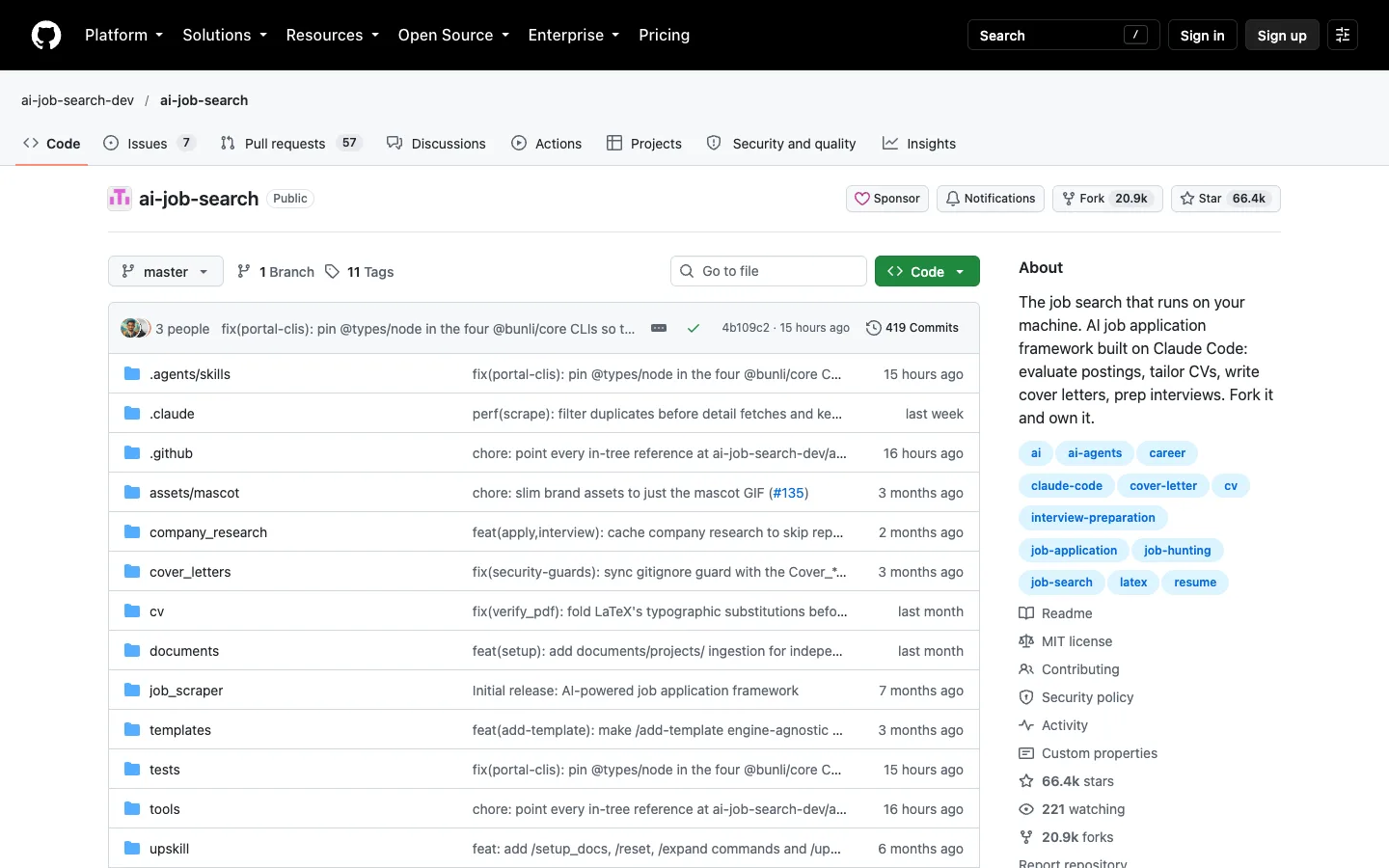
The project's public GitHub page, captured on 27/10/2026. Not a local test.
| What | Detail |
|---|---|
| Name | AI Job Search |
| Made by | Mads Lorentzen, PhD (a geophysicist by training) |
| Licence | MIT: free to use, copy and modify, keeping the licence notice |
| Works with | Claude Code (paid). Not the regular Claude chat app |
| Version in this guide | v1.7.3 (19/10/2026) |
| Job sites | Works by pasting the job text. No integration with Gupy, Catho, Indeed Brasil or other Brazilian sites |
| Computer | Mac, Windows or Linux. Does not run on a phone |
What the author says (author's account)
In the project's README, Mads Lorentzen says that when his position was cut in late 2025, he built this workflow for his own job search. According to his account, it took 69 tailored applications, 20 first interviews and 1 signed contract, and he started as an AI engineer in June 2026.
That is one person's own account, not a study, not an independent statistic and not a typical result. Nobody guarantees a job, an interview, or that your CV gets past automated filters (ATS). What it offers is organisation: reuse your history and build specific, reviewed documents for each job, instead of sending everyone the same CV.
How it works, in plain words
- Profile, once. You describe your experience (pasting your current CV or answering questions). That becomes your profile.
- Paste the job. Copy the text of a job posting from any site (Gupy, LinkedIn, the company's site…) and paste it. The README says: “you can paste the job description directly”.
- CV and cover letter for that job, nothing invented. The README promises: “All claims in the CV and cover letter are verified against your actual profile. The system never fabricates skills or experience.”
- A second agent critiques. Another “agent” (a separate Claude session that starts fresh, without the first one's context) researches the company and critiques the drafts; the first one revises. The author warns in his article: “The reviewer is a preliminary check, not the final word.” The final word is yours.
- Interview. The
/interviewcommand builds likely questions for that job and offers a mock interview.
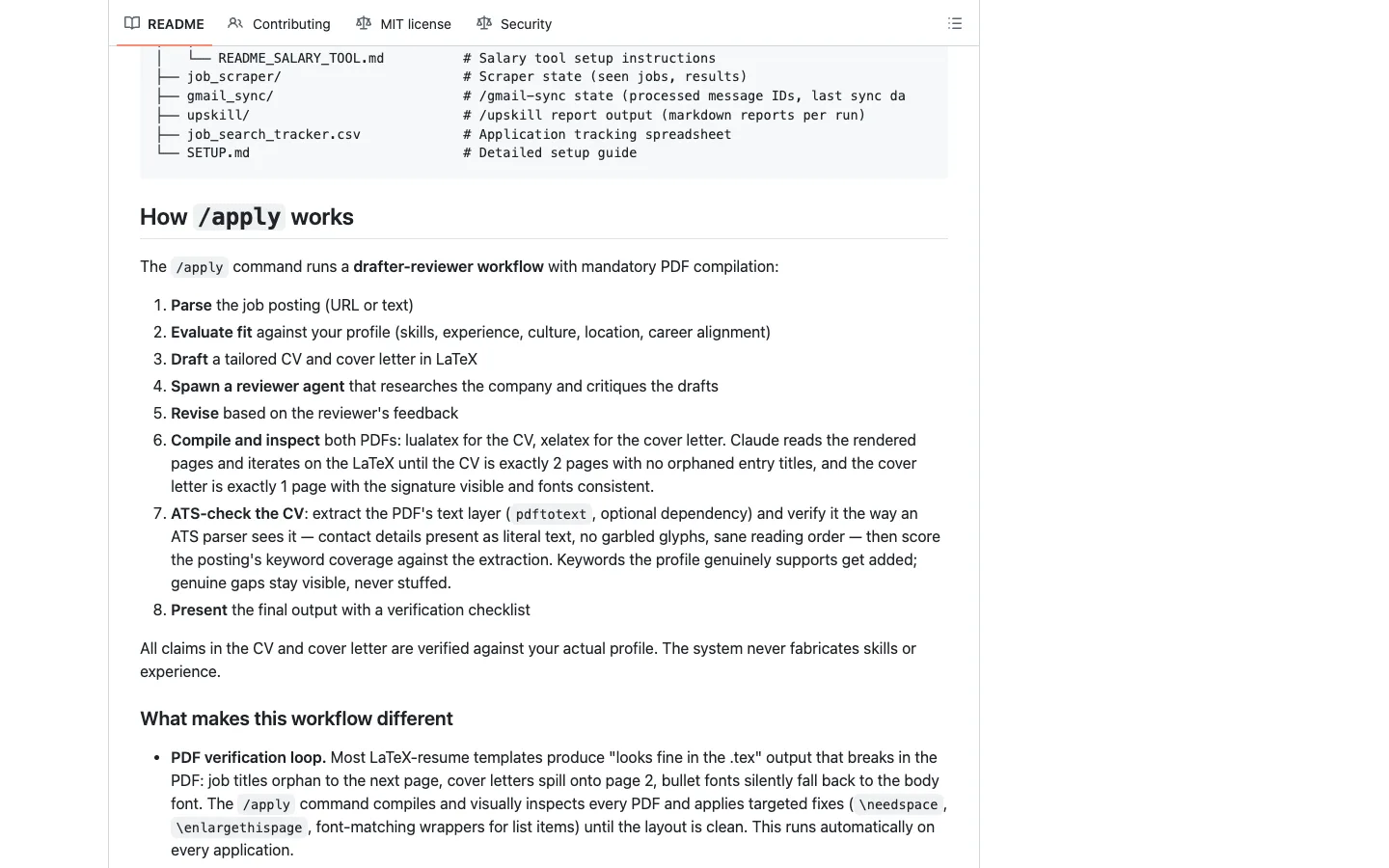
The “How /apply works” section of the public README, captured on 27/10/2026. Not a local test.
The simplest path (no coding)
Step from the documentation, not tested by us. This is the path with the least terminal: everything through installers and the Claude desktop app. You only type the project's own commands (/setup, /apply, /interview) inside Claude.
Subscribe to a plan that includes Claude Code
- Create your account at claude.com.
- Subscribe to a plan with Claude Code. On 27/10/2026, claude.com/pricing showed: Free US$ 0 (no Claude Code), Pro US$ 20/month billed monthly or US$ 17/month billed annually (with Claude Code), Max from US$ 100/month. Prices exclude tax and may change.
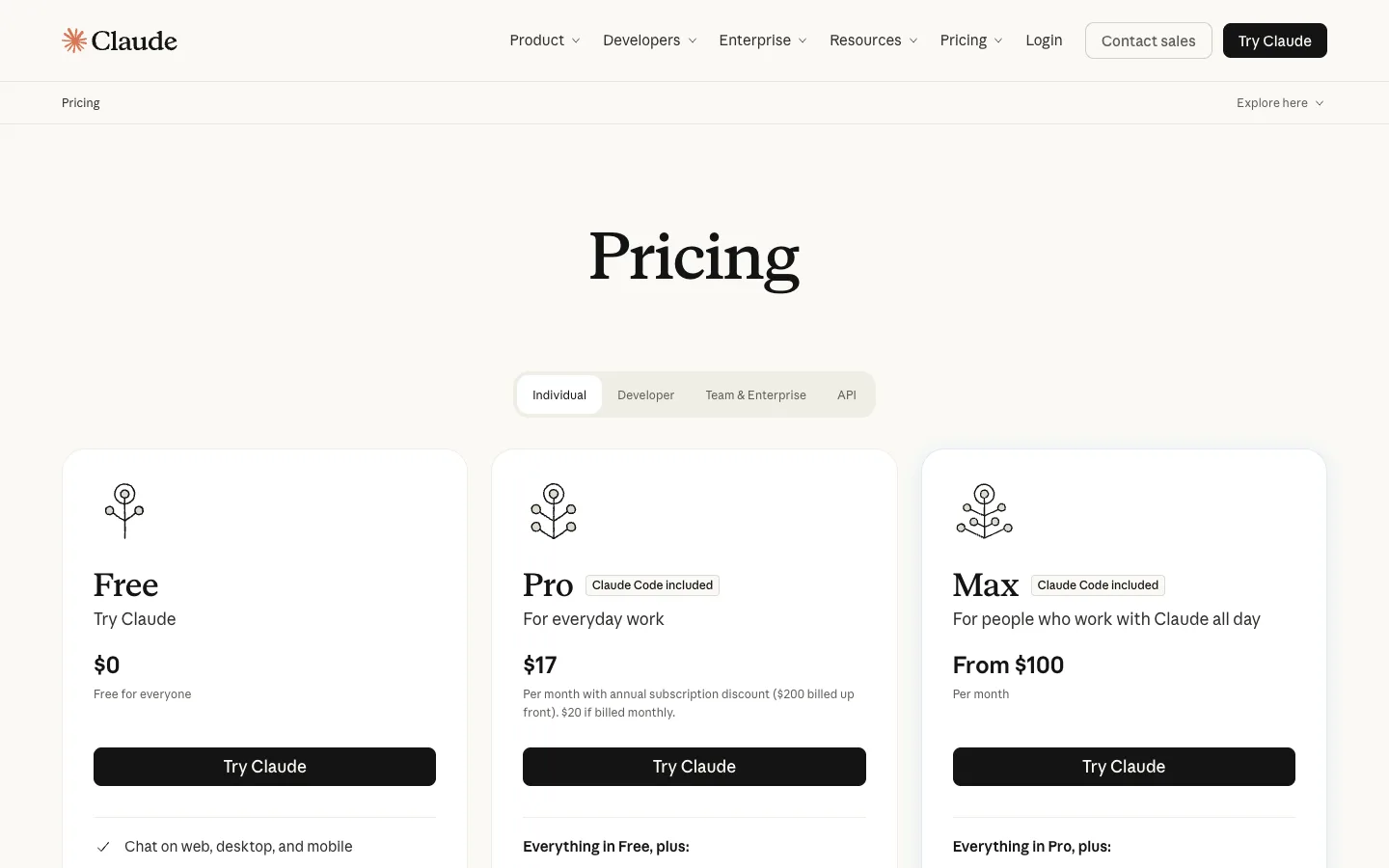
Claude's public pricing page, captured on 27/10/2026. Always check the current price.
Each use counts against your plan's limits. A full application goes through several steps (evaluate, write, review, build and check the PDFs), so it can use a fair share of your limit. We did not measure how much.
Install the Claude app, Python and LaTeX
Three programs, all with regular installers (next, next, finish):
- Claude desktop app (Mac, Windows or Linux). Download it from the official Claude Code Desktop page, sign in and click the Code tab. According to Anthropic's documentation, the app already includes Claude Code, with nothing else to install for it.
- Python 3.10 or newer, from python.org/downloads. The project uses Python to check the job text and the PDFs. On Windows, tick “Add python.exe to PATH” during installation.
- LaTeX, the program that turns the CV into a PDF. The README asks for an install with
lualatexandxelatex. The full options, which include everything:
Bun (another program the README mentions) is only for automatic searches on job sites (Danish portals, LinkedIn and freehire.me). To paste job postings, you don't need it.
Download your copy of the project and open it in Claude
Because the project is MIT-licensed, we keep a copy of release v1.7.3 here, identical to the author's published release, licence included:
Download: AI Job Search v1.7.3: full project + MIT licence (ZIP, 1.7 MB) · MIT licence (text)
- Unzip it. A folder called
ai-job-searchappears. Keep it somewhere of your own, for example in Documents. - Open the Claude app, go to the Code tab, choose the Local environment and, under “Open folder…”, select the
ai-job-searchfolder. - Leave the permission mode on Manual (Claude asks before creating files or running commands). Read every request before approving it.
Why a copy on your computer and not a public “fork”: the README itself warns that a GitHub fork is always public, and /setup writes your data (name, contact details, history, salary expectations) into project files. A folder on your computer stays with you. If you ever want it on GitHub, use a private repository (see “Going further”).
Build your profile once with /setup
In Claude's message box, type:
/setup
According to the README, /setup offers three paths: read a documents/ folder with your files (CV PDF, LinkedIn export, diplomas, reference letters), import a single CV (pasted into the chat or attached) or interview you, section by section.
Tips from the README itself:
- Detail matters most. Don't just list job titles: describe what you did, tools, projects and real results.
- Instead of “Excel”, say where and how you used it: “built the store's returns and exchanges tracking spreadsheet”.
/setupasks which language you want your CV in. The default is English. For jobs in Brazil, answer Portuguese.
Paste a job with /apply and review the result
Copy the full text of the job posting (from Gupy, LinkedIn or anywhere) and paste it after the command, like this:
/apply <paste the full job posting here, with company name, role and city>
According to the README's “How /apply works” section, it then:
- Reads the posting (and runs the text through a check that strips hidden text and instruction-shaped lines).
- Evaluates whether the job fits your profile, and asks if you want to continue.
- Writes a CV and cover letter for that job.
- Spawns a second agent that researches the company and critiques the drafts.
- Revises based on the critique.
- Builds the PDFs and checks the layout (the workflow aims for a 2-page CV and a 1-page cover letter).
- Checks the CV the way an applicant tracking system (ATS) reads the PDF. Keywords your profile supports go in; what you don't have stays a visible gap, never stuffed in.
- Presents the result with a verification checklist.
EXAMPLE (hypothetical, not real output from the program). The “Analista de Atendimento” (customer service analyst) job asks for customer service, Excel and intermediate English, and lists “advanced Python” as a nice-to-have. Your profile has 3 years of in-store customer service, everyday Excel and intermediate English. Under the README's rule, the CV highlights only what is in your profile (customer service, Excel, English) and does not add “advanced Python”, because you don't have it: it is recorded as a gap.
Now it's your turn: open the PDFs, read every line, change what doesn't sound like you and fix any mistake. Then you go to the job site, upload the files and press send. The README also reminds you that postings are treated as untrusted text, so skim what was read and written before you send.
General guidance (not a project rule): many jobs in Brazil don't ask for a cover letter. Use it when the process has a field for one or when you apply by email.
Prepare the interview with /interview
When you get an interview, first record that you applied (/apply suggests /outcome for this), then type:
/interview
According to the README, /interview uses the exact posting, the CV and cover letter you sent, researches the company, maps likely questions to your real stories (STAR format: situation, task, action, result) and offers a mock interview, with feedback after each answer. Where you have a gap, it suggests an honest bridge answer, never invented experience.
What is true (and what the video simplified)
- “He built a system with Claude”: it is Claude Code, Anthropic's coding tool, not the regular chat app. The project is independent: not made or endorsed by Anthropic.
- “69 applications, 20 interviews, 1 contract”: that is the author's own account of his search, in the README. Not an independent statistic or an expected result for users.
- “He released it all for free”: the project is free (MIT). Claude Code is paid (a Claude subscription or the API).
- “From Gupy, LinkedIn, anywhere”: it works by pasting the job text. There is no ready-made integration with Gupy, Catho or Indeed Brasil.
- “It critiques everything before you send it”: the reviewer is a preliminary check. You do the real review and you send.
- It never leaves your computer? It does: Claude Code sends what it reads (your profile, the posting) to Anthropic's servers for processing. The files are stored in your folder, but it is not offline.
Going further
Optional, for terminal users. Commands from the v1.7.3 README and SETUP.md — from the documentation, not tested by us. Run one command at a time.
1. Install Claude Code in the terminal (Anthropic's official command). Mac, Linux or WSL:
curl -fsSL https://claude.ai/install.sh | bash
Windows, in PowerShell:
irm https://claude.ai/install.ps1 | iex
2. Check Python (it must be 3.10 or newer):
python3 --version
On Windows, use py --version.
3. Install Bun (only if you will use the automatic /scrape search). Mac and Linux:
curl -fsSL https://bun.sh/install | bash
Windows:
winget install Oven-sh.Bun
4. Install LaTeX with lualatex and xelatex. Debian/Ubuntu:
sudo apt install texlive-full
Fedora:
sudo dnf install texlive-scheme-full
If you prefer a minimal install (TinyTeX or BasicTeX), SETUP.md says to add these packages:
tlmgr install moderncv fontawesome5 fontawesome6 academicons import luatexbase pgf titlesec textpos xltxtra xunicode cite realscripts needspace
5. Optional: PDF reader for the ATS check:
pip install pypdf
6. Get the project and keep it in a private repository. Instead of a fork (always public), clone the original:
git clone https://github.com/ai-job-search-dev/ai-job-search.git
Go into the folder:
cd ai-job-search
Rename the original remote to upstream, to keep receiving updates:
git remote rename origin upstream
Create an empty private repository in your GitHub account and connect it (replace YOUR-USERNAME):
git remote add origin https://github.com/YOUR-USERNAME/ai-job-search-private.git
Before every git push, check what will be uploaded (git status and git diff): your profile files are tracked. According to SETUP.md, the application tracker, salary data, the documents/ folder and application archives are kept out of git (.gitignore).
7. Optional: job-site search tools (needs Bun):
python3 tools/install_portal_clis.py
8. Open Claude Code inside the folder:
claude
And use the same commands as the simple path: /setup, then /apply <job text>, then /interview.
9. Build the PDFs by hand, if needed (replace <company>_<role> with the file name that was created):
cd cv && lualatex main_<company>_<role>.tex && cd ..
cd cover_letters && xelatex cover_<company>_<role>.tex && cd ..
Permissions and safety (from the project's SECURITY.md). The .claude/settings.json file only pre-approves the workflow's own commands, always asks before git push, and blocks data-upload commands and reads of credential files. Every LaTeX compile asks for permission: answer each one, without “don't ask again”. The project itself says these defences are not a sandbox. On macOS and Linux it recommends turning on Claude Code's sandbox in your user settings.
Other commands in the README: /outcome (records what happened to each application and drafts follow-ups, never sends), /rank (ranks several jobs), /expand (enriches your profile from your own public links), /upskill (shows skill gaps and a study plan), /html-report (application dashboard), /add-template (use your own CV template), /reset (wipes the profile, with confirmation).
What this guide deliberately does not teach: the automated LinkedIn search. The README itself warns that automated access is against LinkedIn's Terms of Service. For LinkedIn jobs, copy and paste the text like any other site.
Quick questions
Do I need to know how to code?
Not for the simple path: you install three programs, open the folder in the Claude app and type /setup, /apply and /interview. But Claude Code is a coding tool: it will ask permission to create files and run commands, and you need to read and approve them. If something fails, you can ask Claude itself for help in the chat.
Is it free?
The project is free (MIT). Claude Code is paid: there is no free plan. You need Claude Pro or Max, or API credits (pay per use). On 27/10/2026, Pro cost US$ 20/month billed monthly (claude.com/pricing). Python and LaTeX are free.
Does it work on my computer? And on my phone?
It works on a Mac, Windows or Linux computer (according to Anthropic, Claude Code needs macOS 13+, Windows 10 1809+ or Ubuntu 20.04+, and 4 GB of RAM). It does not work on a phone: it needs Python and LaTeX installed on a computer.
Is it safe?
It depends on using it carefully:
- Your data goes to Anthropic for processing (not offline). The files stay in your folder.
- Don't publish your profile. Use a local folder or a private repository, never a public fork. Before any
git push, review the commits. - Read the permissions Claude asks for before approving.
- Review everything before sending. The posting is third-party text and the automatic reviewer is not the final word.
Does it work with Gupy?
It works by pasting the job text from Gupy. There is no integration with Gupy (or Catho or Indeed Brasil): it doesn't log in, doesn't search jobs there and doesn't apply for you.
Does it work in Portuguese or Spanish?
The workflow is designed to be language- and country-agnostic (README). You choose the CV language in /setup (English by default), and /apply's instructions make the cover letter match the posting's language. The project's examples are in Danish and English; we did not test it in Portuguese or Spanish.
Honest limits
- No guarantee of a job, an interview, or passing automated filters (ATS).
- It sends nothing by itself. You review and send.
- It doesn't invent experience, but it can make mistakes. Read every line.
- The 69/20/1 figures are the author's account of a single search.
- The automatic job search was built for Danish sites; elsewhere, paste the job text.
- Cost: every application uses part of your Claude plan's limits.
- Version: this guide describes v1.7.3 (19/10/2026). The project moves fast; commands may change.
Credits and source

Pip, the project's mascot. Artwork by Mads Lorentzen, MIT licence.
- Project: AI Job Search by Mads Lorentzen, PhD. Copyright (c) 2026 Mads Lorentzen, MIT licence. The ZIP copy on this page is release v1.7.3, unmodified.
- Official source: github.com/ai-job-search-dev/ai-job-search (the old MadsLorentzen/ai-job-search address redirects there).
- The author's article (March 2026): I Automated My Job Search. It Made the Process More Human, Not Less.
- Claude pricing: claude.com/pricing (checked on 27/10/2026).
- The project is not affiliated with Anthropic, and this guide is not affiliated with the author.
Comments
Have a question or something to add? Join the conversation.
No account needed. Select Sign in and choose a name to comment.
Loading the conversation…
Comment privacyCommenting guidelines