


TradingAgents is an open-source framework that runs a whole trading desk on your computer, with an AI agent in every chair. Analysts read the fundamentals, the news, the social chatter and the technicals. A bull and a bear researcher argue over their reports. A trader turns the debate into a proposal, a risk team stress-tests it, and a portfolio manager gives the final call. You choose the ticker, the date and the model. It was built by researchers at UCLA and MIT and is free to run.
Before you start
- A computer with macOS, Windows or Linux, plus
git. - Python 3.10 or newer (the project's own example uses 3.12). Check with
python3 --version. - One LLM provider: an API key from OpenAI, Anthropic, Google, xAI, DeepSeek, OpenRouter, Groq or another supported provider, or Ollama for a free local model.
- No brokerage account. TradingAgents only analyses and recommends; it does not place orders.
Every run costs tokens. A single analysis makes dozens of model calls (the screenshots below show 45 for one full run). Start with the cheaper models and the shallow research depth, then go deeper once you know what a run costs you.
This is a research tool, not investment advice. The project says so itself. Treat the output as one more opinion to check, never as an order to execute.
Install TradingAgents
Clone the repository and enter it:
git clone https://github.com/TauricResearch/TradingAgents.git && cd TradingAgentsCreate a virtual environment and activate it (on Windows, run .venv\Scripts\activate instead of the source line):
python3 -m venv .venv && source .venv/bin/activateInstall the package and its dependencies:
pip install .That gives you the tradingagents command inside this environment. Prefer Docker? Copy .env.example to .env, add your keys, and run docker compose run --rm tradingagents instead.
Add a model provider
TradingAgents reads API keys from a .env file in the project folder. Copy the template:
cp .env.example .envOpen .env and fill in the key for the provider you will use, for example:
OPENAI_API_KEY=sk-...One key is enough. The file also has slots for ANTHROPIC_API_KEY, GOOGLE_API_KEY, DEEPSEEK_API_KEY, OPENROUTER_API_KEY, GROQ_API_KEY and others, and an optional FRED_API_KEY for macro data from the Federal Reserve.
Free local models. Install Ollama, pull a model with ollama pull <name>, and pick Ollama as the provider in the CLI. It talks to http://localhost:11434/v1 by default. Any other OpenAI-compatible server (vLLM, LM Studio, llama.cpp) works through the OpenAI-compatible provider, where you type the server's URL.
The same file can preset choices so the CLI skips a question: TRADINGAGENTS_LLM_PROVIDER, TRADINGAGENTS_DEEP_THINK_LLM, TRADINGAGENTS_QUICK_THINK_LLM and TRADINGAGENTS_OUTPUT_LANGUAGE are the useful ones.
Run an analysis
With the environment active, start the CLI:
tradingagentsIf the command is not found, python -m cli.main does the same from the project folder.
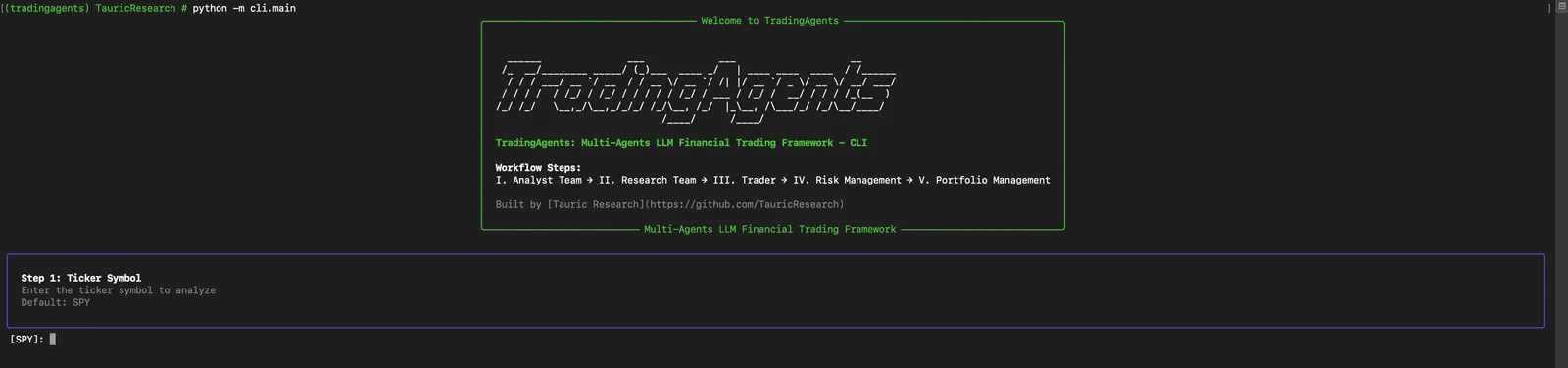
The CLI walks you through six questions:
- Ticker.
SPYis the default. Use Yahoo Finance symbols:AAPL,NVDA,BTC-USD, or exchange-suffixed tickers such asAZN.Lor7203.T. - Analysis date.
YYYY-MM-DD. Pick a trading day; weekends and holidays have no data. - Output language. The reports and the final decision come out in the language you choose; English, Spanish and Portuguese are on the list.
- Analysts team. Space toggles each of Market, Social, News and Fundamentals;
aselects all. - Research depth. Shallow (1 debate round), Medium (3) or Deep (5). Deeper means more calls and more tokens.
- LLM provider and models. Pick the provider, then a quick-thinking model for the analysts and a deep-thinking model for the debate and the decision.
Then it runs. The left panel tracks each agent, the right panel streams every tool call and reasoning step, and the report grows at the bottom as each analyst finishes.
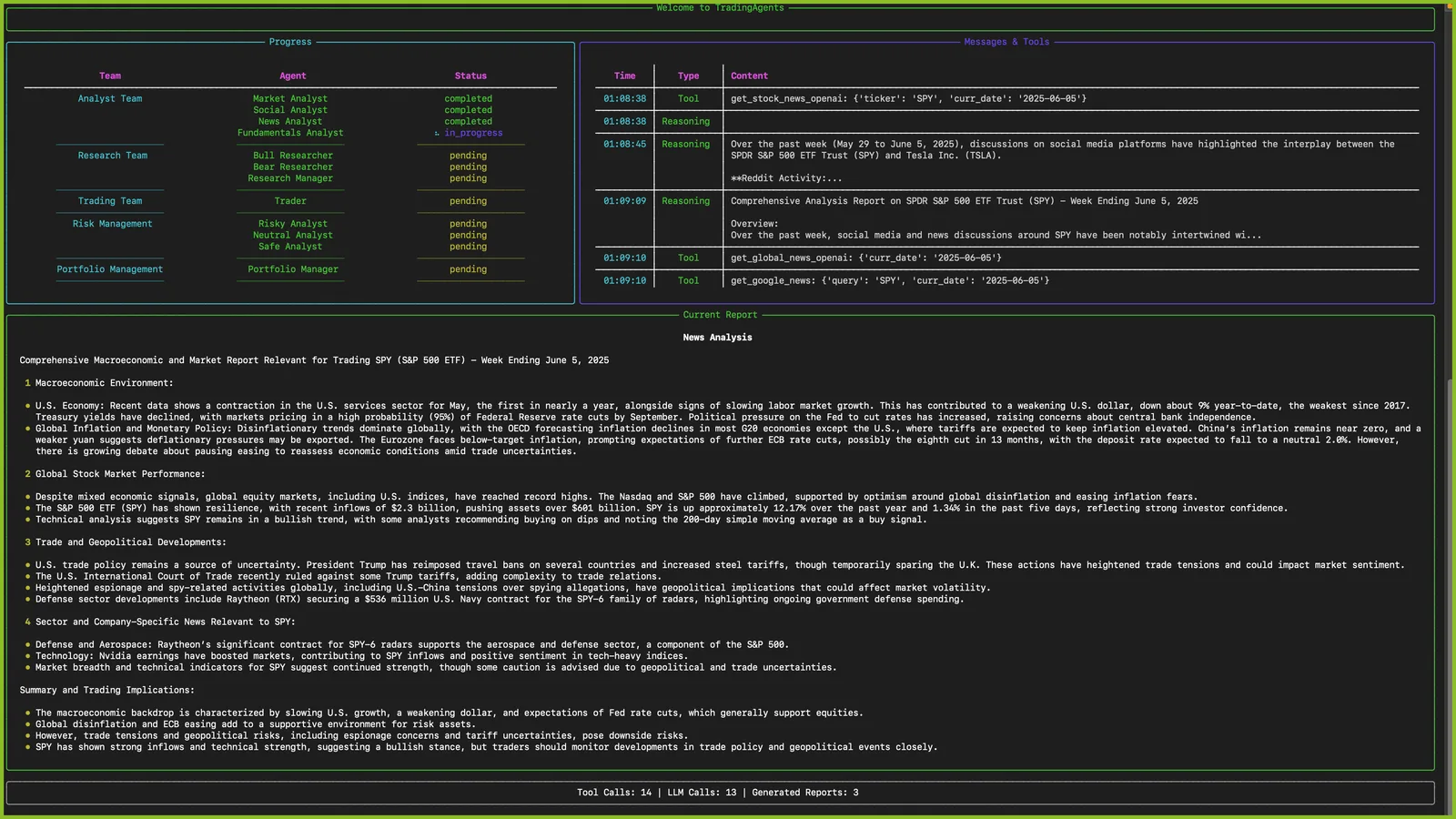
Screenshot: TradingAgents project. The news analyst's report, with the other analysts still pending.
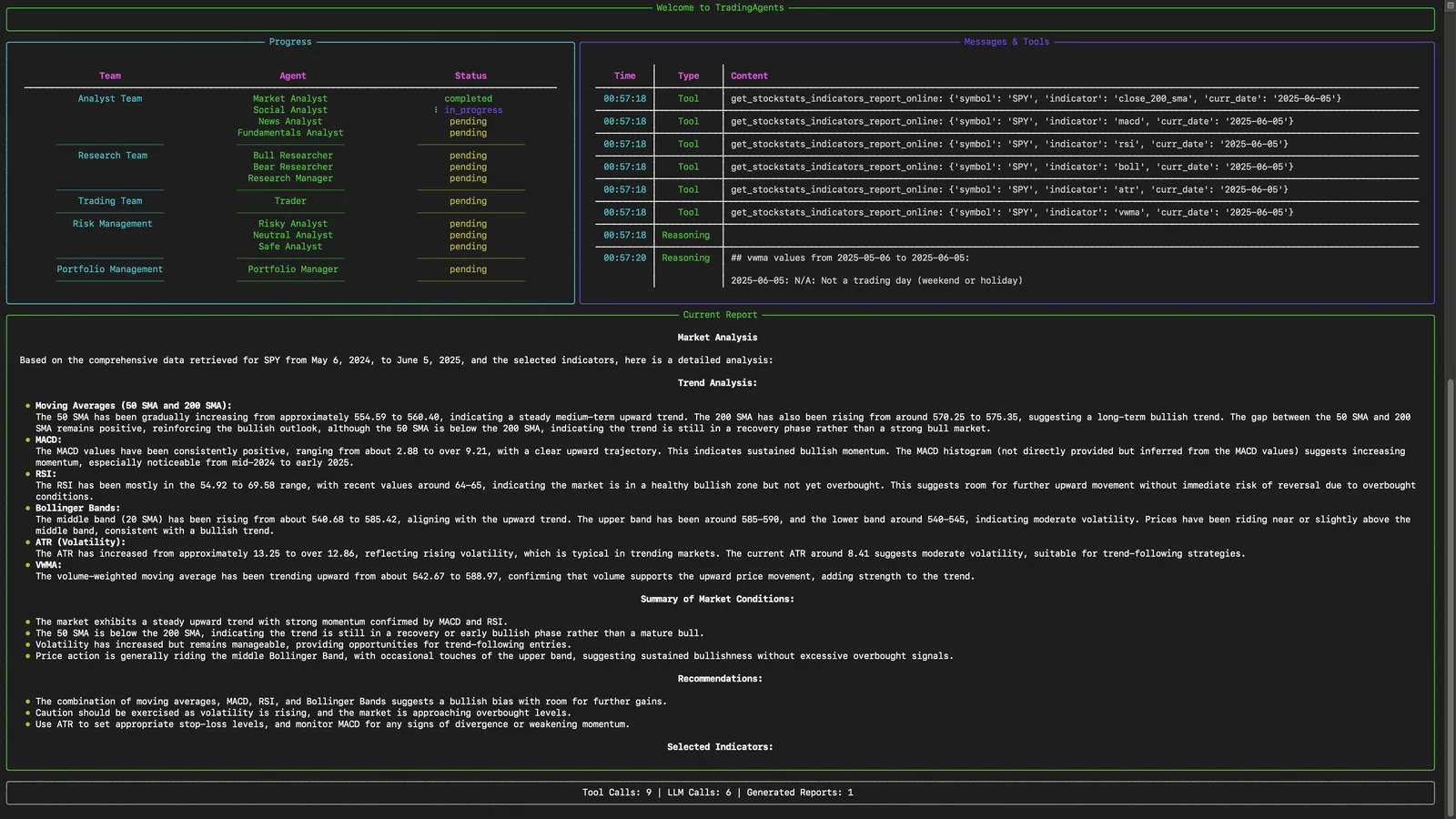
Screenshot: TradingAgents project. The market analyst pulls indicators (SMA, MACD, RSI, Bollinger, ATR) before writing.
Read the decision, then the memory
When every team has finished, the CLI asks whether to save the report to disk and whether to show it in full. The last section is the Portfolio Management Decision: the recommendation, the key arguments from the risky, safe and neutral analysts, and the plan.
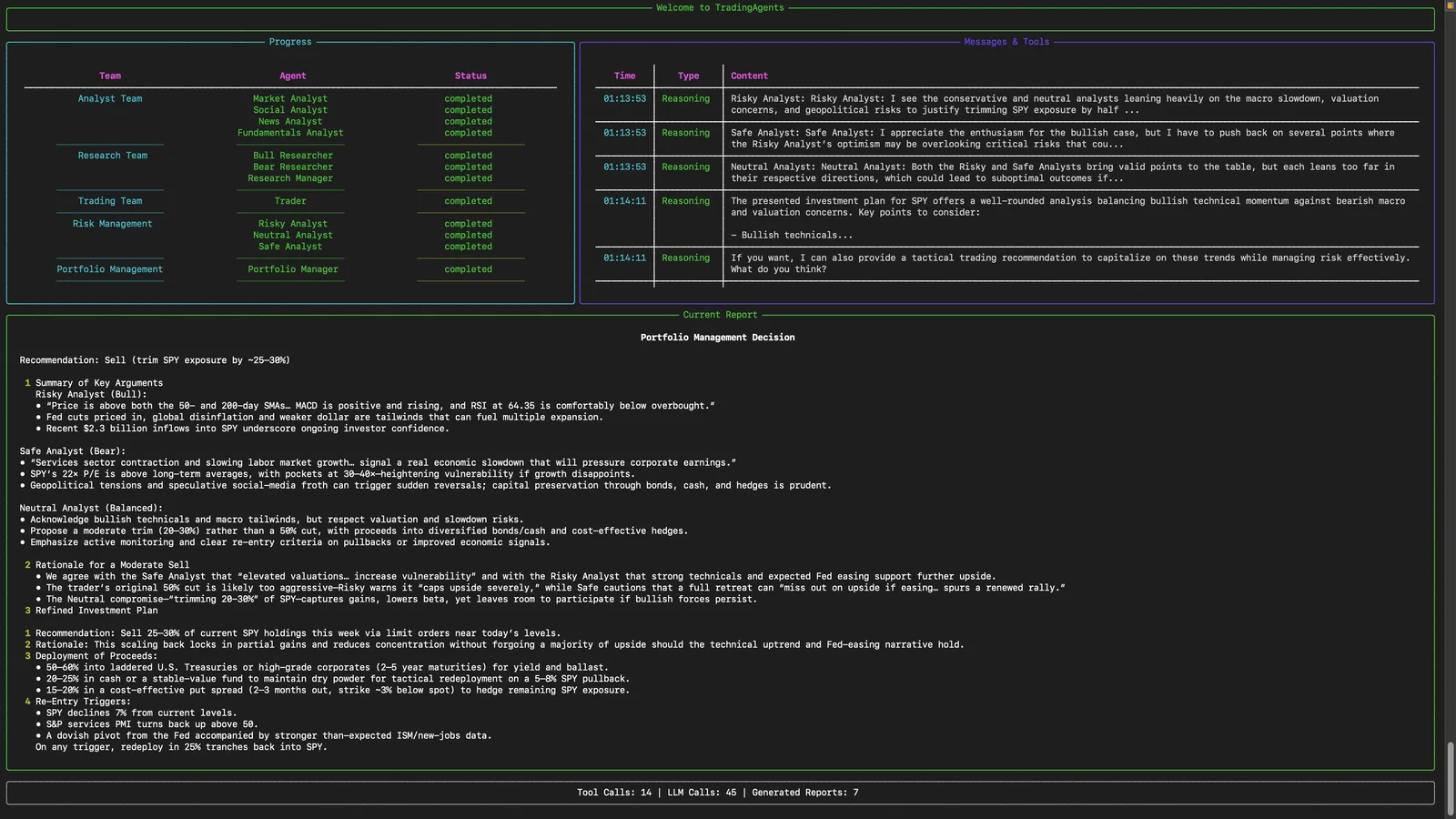
Screenshot: TradingAgents project. A completed run ending in a Sell recommendation with a staged plan.
It remembers. Every completed run is appended to ~/.tradingagents/memory/trading_memory.md. The next time you analyse the same ticker, TradingAgents fetches the realised return since that decision, writes a one-paragraph reflection, and feeds the recent decisions and lessons into the portfolio manager. That is where you see why it was right and why it was wrong.
Long runs can resume. Add --checkpoint and the state is saved after each step, so a crashed run continues from where it stopped:
tradingagents analyze --checkpointUse --clear-checkpoints to start fresh.
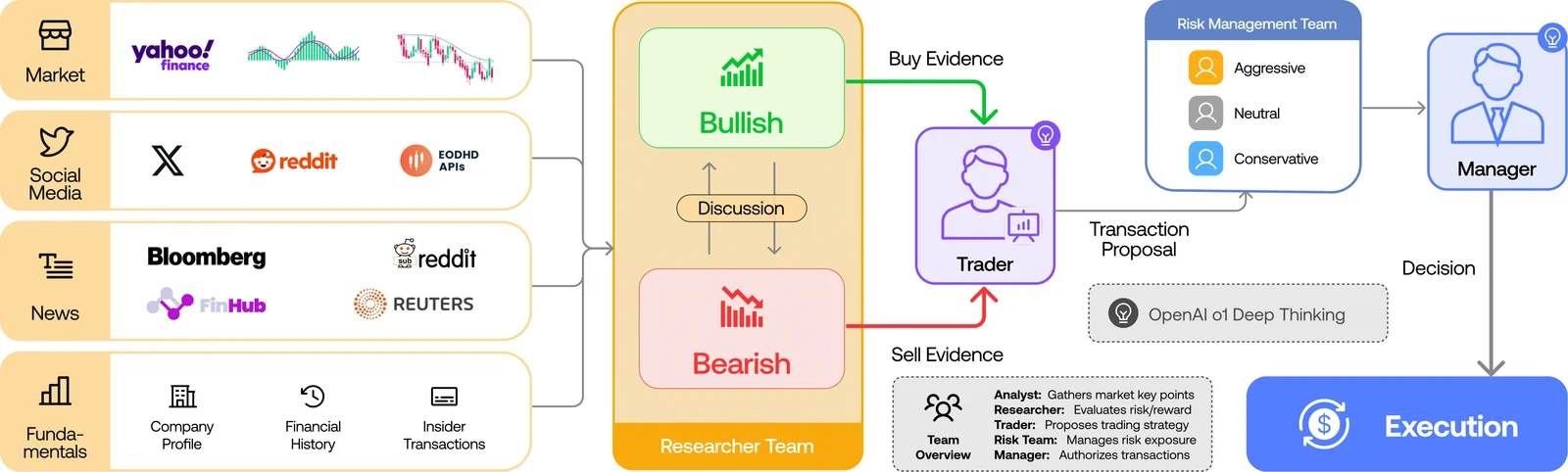
Use it from Python
The CLI is a front end for a LangGraph graph you can call from your own code:
from tradingagents.graph.trading_graph import TradingAgentsGraph
from tradingagents.default_config import DEFAULT_CONFIG

config = DEFAULT_CONFIG.copy()
config["llm_provider"] = "openai"
config["deep_think_llm"] = "gpt-5.6"
config["quick_think_llm"] = "gpt-5.6-luna"
config["max_debate_rounds"] = 1

ta = TradingAgentsGraph(debug=True, config=config)
_, decision = ta.propagate("NVDA", "2026-01-15")
print(decision)
tradingagents/default_config.py lists every option: providers, models, debate rounds, output language, temperature and the paths for the cache and the memory log.
Common problems
- The CLI asks for an API key. The key for the provider you picked is missing from
.env(or the environment). Add it and run again. - "Not a trading day (weekend or holiday)". The date has no market data. Pick a weekday when the market was open.
- Two runs give different answers. Expected: the models are sampled, and news and social data change over time. Lower
TRADINGAGENTS_TEMPERATUREin.envfor less variation; reasoning models mostly ignore it. - Runs are slow or expensive. Choose Shallow depth, fewer analysts and a cheaper quick-thinking model.
- Ollama is not answering. Make sure the Ollama app or
ollama serveis running and the model was pulled. - Windows: "no Windows console available". Run the CLI from Windows Terminal, PowerShell or cmd.exe, not from a piped or embedded terminal.
TradingAgents is open source under the Apache-2.0 licence, built by Tauric Research and described in the paper TradingAgents: Multi-Agents LLM Financial Trading Framework by Yijia Xiao, Edward Sun, Di Luo and Wei Wang. Code and documentation: github.com/TauricResearch/TradingAgents. This guide was written for version 0.4.0.
Comments
Have a question or something to add? Join the conversation.
No account needed. Select Sign in and choose a name to comment.
Loading the conversation…
Comment privacyCommenting guidelines