

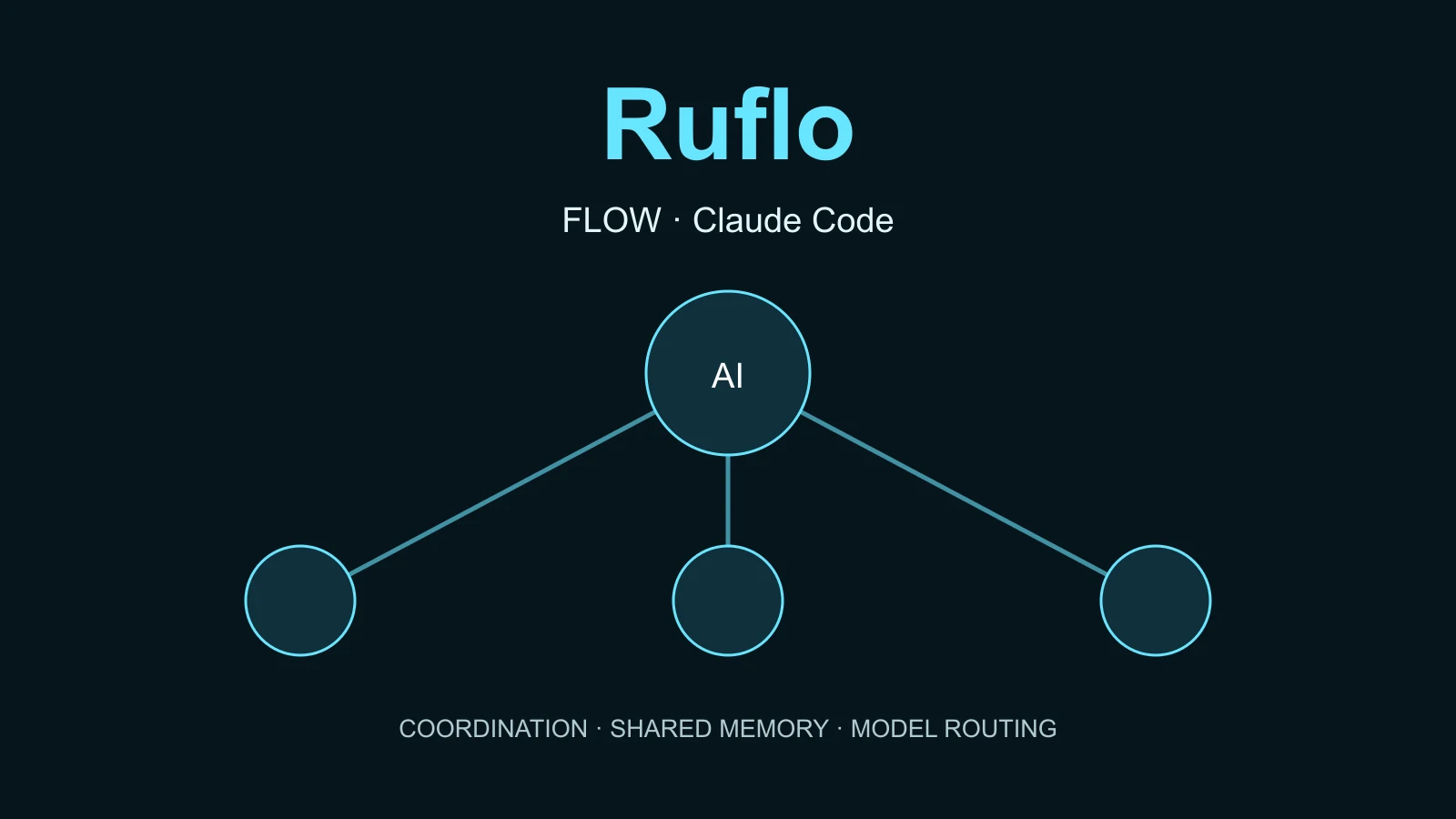

Ruflo is an open-source toolkit that helps an AI coding assistant organise work: choose specialists, keep project memory and recommend which model should handle a task. Think of it as coordination around the assistant you already use, not a new chatbot or a model you download.
You can start without knowing how to program. The first goal here is deliberately small: open an empty practice folder, add Ruflo to Claude Code and ask for a plan. You do not need to build an app, connect a production account or launch a team of agents to understand it.
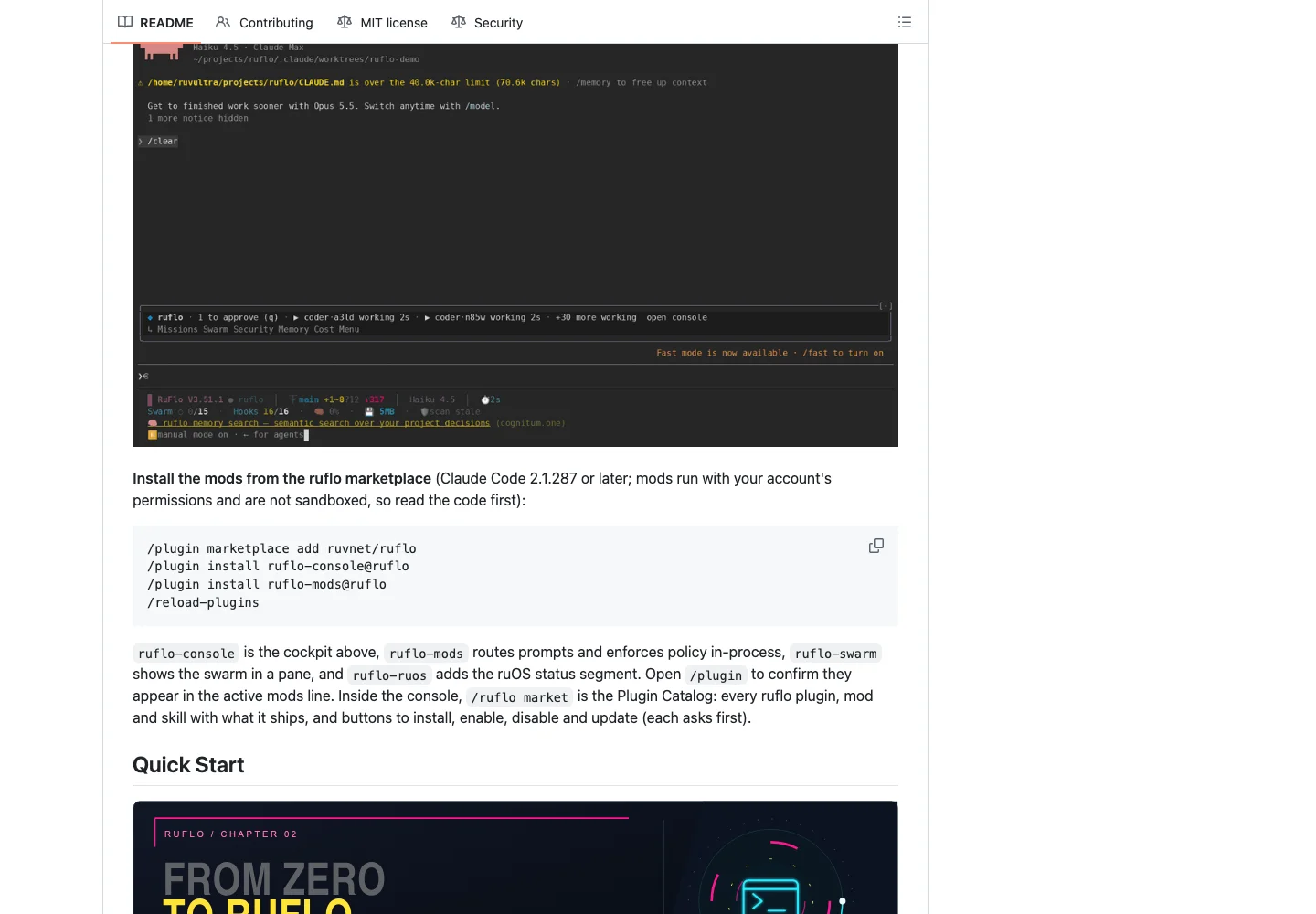
Documentation checked on 22 October 2026. All installation and runtime instructions below are documentation-based, not tested by us. We did not install or run Ruflo, its plugins, MCP servers, hooks or benchmarks. Example prompts are illustrative, not tested conversations. Screenshots show public source pages, not our runtime.
What it is useful for
A coding assistant can turn a plain-language request into files, run commands and explain the result. Ruflo adds ways to coordinate that work: a planner can propose steps, another agent can review changes, memory can retain useful context, and routing can recommend a suitable model. A “swarm” is a coordinated group of agents, not extra intelligence for free: more agents can mean more calls, cost and opportunities for mistakes.
For a first experiment, imagine a small page describing your business. Ask what should be built before allowing any construction. For a one-off text request, your existing assistant may be enough; Ruflo becomes more relevant when work has several stages, reviewers or sessions.
Prepare Claude Code and a practice folder
Documented instructions; not tested by us. Use a Mac, Windows or Linux computer with internet access. Claude Code needs its own supported account/login and usage arrangement. Ruflo's source being free does not make Claude or provider calls free.
Claude Code is the assistant you will type into. A terminal is the app where you paste commands: Terminal on macOS, your Linux terminal, or PowerShell on Windows. If Claude Code is already installed, skip its installation and check the version.
Install Claude Code if you do not have it
These are Anthropic's official native installation commands, checked on 22 October 2026. They download and execute an installer; review that trust decision before running them. Choose one, matching your system.
macOS / Linux / WSL:
curl -fsSL https://claude.ai/install.sh | bashWindows PowerShell, not Command Prompt:
irm https://claude.ai/install.ps1 | iexOpen a new terminal after installation, then check:
claude --versionThe Ruflo core/console/mods onboarding requires Claude Code 2.1.287 or newer. If the command is not found, resolve the installation/PATH before proceeding. The native Claude installer does not remove Ruflo's separate requirement for Node.js 20+ and npm 9+, or a supported alternative package manager. npx comes with npm. Check both:
node --version
npm --version
If either is missing or too old, install a supported Node.js release with npm first. Some advanced codemod batch/glob features use Node 22 APIs; use Node 22+ for those rather than assuming Node 20 covers every feature.
Start somewhere disposable
In your file manager, create a new, empty folder called ruflo-practice inside your Documents folder. Do not use a company repository, your home folder or a folder containing private documents. Open a terminal in that folder using your system's “Open in Terminal” option; alternatively type cd , drag the folder into the terminal and press Enter. Check the terminal's displayed path before starting:
claudeFollow Claude Code's sign-in prompts and read the folder trust question. A blank folder has no app yet; that is intentional. Folder choice limits what you intend to work on, not what plugins can access with your account permissions. A plugin installation can also persist beyond this practice folder; inspect the scope offered by Claude Code rather than assuming everything is local.
Add just Ruflo Core inside Claude Code
Documented plugin path; not tested by us. The following are slash commands inside the Claude Code conversation, not terminal commands. Send them one at a time. Read any installation and trust prompts before accepting.
/plugin marketplace add ruvnet/ruflo/plugin install ruflo-core@ruflo/reload-pluginsCore supplies Ruflo's tools. It already declares an MCP server, the connection that lets Claude call those tools, plus plugin hooks. Do not add a second MCP server or run CLI init just because you installed Core. Choose one setup path first.
Use Claude Code's plugin management screen to check that Core is enabled and inspect its MCP/tool status. With this plugin, tool names can start with mcp__plugin_ruflo-core_ruflo__; another client may show different names. An enabled plugin is not proof that its tools or hooks have actually done useful work.
If installation or reload fails, stop here and read the error. Repeatedly stacking CLI, plugin and MCP installations is not a repair strategy.
Ask for a plan, not permission to build
Illustrative prompt; not tested. Paste this into the Claude Code conversation after checking the installation:
I am learning in this empty disposable folder. I want a simple one-page site for a fictional neighbourhood bakery. Explain in plain English what Ruflo could help with and propose a small plan only. Do not create or change files, run shell commands, install anything else, spawn agents, connect accounts, deploy or start paid provider work without my separate explicit approval. Tell me what permissions and possible usage costs the next step would involve, then wait.You are asking for a scope, proposed files, a way to check the result and the next permission needed. Even this planning message can consume Claude usage. “Do not start paid work” is a requested boundary on subsequent actions, not a billing switch or a technical sandbox. If you cannot authorise any usage at all, stop before sending a message and read the examples here instead.
Read the response. Does it explain what will happen in words you understand? Does it distinguish a suggested model from an agent that actually ran? If it asks to execute something unexpected, decline. When you are ready, authorise only one small, explicit step in the disposable folder and inspect the resulting files before continuing. No result from that future experiment is claimed by this guide.
A useful first success is understanding the plan, not seeing a swarm run. You can stop here. Console, mods and CLI configuration are optional next choices, not missing beginner steps.
Going further
Everything in this section is documentation-based and untested by us. Do not paste every block in sequence. Plugin, CLI initialisation and manual MCP registration solve different problems.
Full upstream onboarding: Core, Console and Mods
Core provides tools; Console is the cockpit; Mods add in-process routing/policy behaviour to Claude Code. The documented full sequence is below. If you already installed Core, do not reinstall it unnecessarily: continue with the optional plugins you have reviewed.
/plugin marketplace add ruvnet/ruflo
/plugin install ruflo-core@ruflo
/plugin install ruflo-console@ruflo
/plugin install ruflo-mods@ruflo
/reload-plugins
/ruflo
Review mods before enabling them. They are not sandboxed: they run in the Claude Code process with your account's permissions. A disposable folder is not a containment boundary. Hooks are scripts triggered by events in the host; declared hooks do not establish that every hook fired correctly. Do not disable Claude Code's permission checks to make this work.
CLI setup: choose a wizard or an explicit init
The CLI is Ruflo's terminal interface. npx downloads/runs a package without requiring a global Ruflo installation; that does not mean it makes no persistent changes. @latest is moving, not a reproducible version pin. The documentation snapshot checked here reports package version 3.59.14, not a verified npm dist-tag.
Prefer the guided wizard if you want help choosing configuration:
npx ruflo@latest init wizardFor non-interactive defaults, the alternative is:
npx ruflo@latest initBack up before either. Init can create or change .claude/, .claude-flow/, CLAUDE.md, .mcp.json, settings and helper scripts. By default it can also add an integration pointer in ~/.claude/CLAUDE.md, enable/install mods and register skills. Keep a separate copy of existing project and user-level settings, including hidden files; a project Git commit alone does not back up home-directory settings. Never use --force as a routine retry: it authorises overwriting existing configuration.
For a deliberately reduced setup, these documented flags can be combined as follows. This is an illustrative combination of verified options, not an execution-tested isolation recipe:
npx ruflo@latest init --minimal --no-global --no-mods --no-plugin-install --no-skills-sh --no-codex-detect --no-signup| Init option | Meaning and boundary |
|---|---|
--minimal / -m | Create minimal configuration; not “no hooks, no writes or no network”. |
--full | All profile components; authenticated cloud MCP remains opt-in through --cloud-mcp. |
--no-global | Skip the Ruflo pointer in ~/.claude/CLAUDE.md; not complete global isolation. |
--no-mods | Skip enabling/installing the Ruflo mod plugins; classic hooks can remain. |
--no-plugin-install | With mods, write settings without running plugin installation; not equivalent to disabling mods. |
--no-skills-sh | Skip post-init npx skills add ruvnet/ruflo registration. |
--no-codex-detect | Skip automatically detecting/configuring an installed Codex CLI. |
--no-signup | Skip the post-init Cognitum capability-enrolment prompt. |
--skip-claude | Skip creation of .claude/; runtime-only configuration. |
--only-claude | Create Claude integration, skipping runtime configuration. |
--start-all | Start daemon, memory and swarm after init; additional running work, not a beginner default. |
--start-daemon | Start the daemon only after init. |
--with-embeddings | Initialise the ONNX embedding subsystem; additional dependencies/resources. |
--embedding-model | Choose Xenova/all-MiniLM-L6-v2 or Xenova/all-mpnet-base-v2. |
--all-agents | Opt into the wider agent catalogue rather than the default subset. |
--codex / --dual | Initialise for Codex, or Claude Code and Codex together; can add AGENTS.md, .agents/ and host configuration. |
--grok | Initialise Grok Build host files. |
--grok-statusline | With --grok, also merge the status row into user-level ~/.grok/config.toml. |
--dry-run | Documented with --grok; do not assume a universal init preview. |
--force / -f | Overwrite existing configuration. Back up and review first. |
Codex also exposes --codex-trust: standard uses workspace-write sandbox and on-request approvals; full requests danger-full-access and no approvals. Keep the standard boundary; an existing Codex config is not automatically rewritten. This is not a recommendation to grant full access.
Other documented installation alternatives, not additional required steps:
npm install -g ruflo@latest
ruflo initnpm install -g ruflo@latest --omit=optional--omit=optional omits optional ML/embedding dependencies; it is not init's --minimal flag. With Bun already installed, another alternative is:
bunx ruflo@latest initThe upstream also offers a shell installer that downloads executable code. It is not needed for this guide. Its separate flags are --global/-g, --minimal/-m (omit optional dependencies), --setup-mcp, --doctor/-d, --no-init, --full/-f (global + MCP + doctor + init) and --version=X.X.X. Do not confuse them with init flags. --no-init does not undo global changes requested by other flags. Inspect the pinned installer in the sources before considering that route.
Manual MCP: only if your chosen client needs it
MCP is the tool connection between the assistant and Ruflo. Core already supplies its own server. Do not add this on top of Core automatically. For a CLI-based Claude setup without that server, the README documents:
claude mcp add claude-flow -- npx ruflo@latest mcp startKeep the identifier claude-flow literally as documented. For another MCP client, merge this equivalent command/arguments configuration into the client's existing settings; do not overwrite its other servers:
{
  "mcpServers": {
    "ruflo": {
      "command": "npx",
      "args": ["-y", "ruflo@latest", "mcp", "start"]
    }
  }
}
This JSON is an explicit adaptation, not Core's own .mcp.json. Core uses a Node launcher under ${CLAUDE_PLUGIN_ROOT}; that launcher prefers a resolved local CLI and can fall back to npx -y @claude-flow/cli@latest mcp start.
The standalone stdio process is:
npx -y ruflo@latest mcp startIt is an alternative way to start the server, not a second command required after registering it. Let the client manage its process. Check actual server registration, tool names, first-download delays, permissions and duplicate entries. Console/mods are Claude Code integrations; another MCP client does not automatically gain those host features.
Routing suggests; execution must be verified
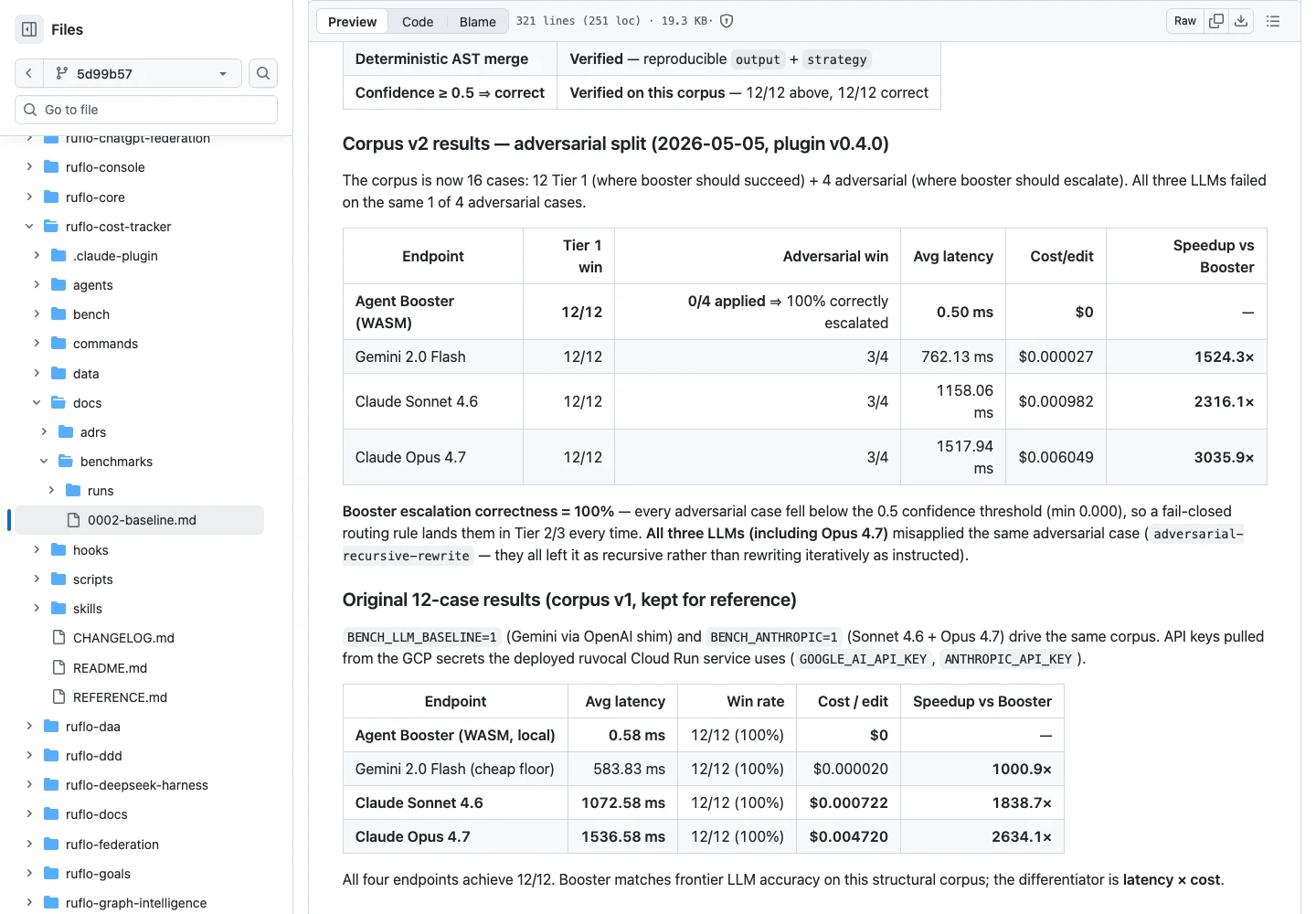
In the 5 May 2026 v2 table, the reported per-edit API cost was US$0 for Agent Booster and US$0.006049 for Opus 4.7. Zero applies to that local edit, not an entire AI session.
The documented design is: eligible structural edits run locally without a model; Haiku for simple tasks, Sonnet for medium tasks and Opus for difficult tasks. Execution agents are Claude Code's own subagents; Ruflo coordinates roles, tasks and shared memory. This is not a new AI model running entirely on your computer or proof that every call automatically switches models.
These documented CLI examples request model recommendations:
npx ruflo@latest hooks model-route --task "fix typo in README"
npx ruflo@latest hooks model-route --task "design distributed consensus system"
The MCP tool hooks_route says “Get a 3-tier routing recommendation for a task” and “Use this BEFORE spawning an agent”. Check whether the caller actually uses the recommended model. A recommendation alone neither changes a file nor proves that an expensive call was avoided.
For eligible Tier 1 edits, the current path is TypeScript-compiler-based deterministic codemods, not Agent Booster/WASM. The supported intents are var-to-const (can choose let for reassignment), remove-console and add-logging. add-types, add-error-handling and async-await escalate to Tier 2/3 models. The signal is [CODEMOD_AVAILABLE]; execution uses hooks_codemod. Start with its dryRun on disposable code and review the diff. It accepts code, a file, a list or a glob; batch/glob support needs the Node 22 API noted above. A dry run here is not a universal init --dry-run.
What the speed and savings claims actually show
Historical upstream results, not our measurements. Benchmark 0002-baseline.md was initially recorded on 4 May 2026 and later includes 5 May 2026 comparisons. In its v2 table (plugin v0.4.0), there are 12 Tier 1 cases plus four adversarial cases:
| 5 May 2026, corpus v2 | Tier 1 passed | Adversarial cases applied | Mean latency |
|---|---|---|---|
| Agent Booster | 12/12 | 0/4; escalated according to the report | 0.50 ms |
| Claude Opus 4.7 | 12/12 | 3/4 | 1517.94 ms |
The published speedup is 3035.9× for these microedits. Both passed 12/12 Tier 1 cases; this does not mean general equal accuracy or a 3035.9× faster project. A separate original-corpus comparison in the same file reports 2634.1× (about 2634×), not a second number to combine with v2.
The implementation subsequently changed. ADR-143, accepted/implemented on 29 May 2026, replaced Booster in Tier 1. It explains that the old execution path was not wired into the CLI/MCP runtime: callers used route(), which emitted a recommendation. Booster applied a precomputed edit; it did not generate a transformation from plain-language intent. This does not erase a direct AgentBooster.apply() microbenchmark, but prevents treating it as proof of automatic integrated routing.
ADR-143 reports a separate codemod benchmark: 12/12, 0.55 ms/edit mean, 3.1 ms p99, no model API charge for the transform. There is no present-day codemod-versus-Opus comparison established by those historical tables. “$0” for a transform does not make planning, agent calls or the complete workflow free.
The User Guide literally claims “75% lower costs by using right-sized models”. It supplies no method or supporting benchmark for that percentage in that claim; we do not present it as measured or guaranteed savings. The older benchmark also lists retrieval token reduction, real-workload Booster savings and cache hit rate as unverified there. Do not add those percentages together.
A useful counterexample is upstream issue #1748: a third-party evaluation against an early May 2026 version reported an identical rename diff with 35% more time and 163% more cost, with no Ruflo tools/hooks used. Maintainers acknowledged real bugs and published targeted fixes, including versions 3.6.29/3.6.30, then requested retesting; a final 11 May comment still noted tool-description gaps. Closed does not mean every outcome was revalidated. Nor does that old report prove the current version fails. Compare your own representative task, same acceptance criteria and baseline, before trusting savings claims.
FAQ and safe stopping points
Do I need to know programming?
Not to ask for a plan or understand the roles. Editing and shipping software still requires someone to assess files, tests, privacy and failures. Start with explanations and a fictional project; ask for help before approving changes you cannot evaluate. Ruflo is not a guarantee that an app is correct or secure.
Is it free? Does it reduce my Claude bill?
The upstream software is MIT-licensed. Claude access, provider APIs, hosting and extra agent calls can cost money or consume a subscription quota. Installation may download packages; the first chat can already consume usage. Set limits with the actual provider, inspect usage and authorise work explicitly. Routing recommendations are not a guaranteed discount.
Do I need a powerful computer? Can I use my phone?
The documented path needs a supported computer, terminal, Node/npm and Claude Code. Anthropic's setup page lists at least 4 GB RAM for Claude Code; that is not a guarantee for every Ruflo workload. Additional local memory/embedding services can need more resources. Provider-backed models do not require you to download a frontier model locally. A phone browser can read this guide, but it does not replace this desktop installation; remote access still requires a secured host computer and adds its own risks.
Does running locally mean private or offline?
No. Plugins execute locally, but model requests can leave the computer for the selected provider. Files, prompts, logs and persistent memory may contain confidential data. Keep secrets and real customer records out of the experiment, inspect permissions, review plugin/mod code and use the provider's privacy controls. Never paste API keys into example prompts or commit them to configuration.
What if I see no tools, repeated tools or a permissions request?
Check the Claude version, active plugin, reload status and actual MCP connection first. Duplicate tools/hooks can indicate that plugin and CLI/manual configuration were stacked. Back up settings, identify the duplicate and keep one intended path; do not delete configuration blindly. For unexpected access, decline and investigate rather than bypassing permission checks. A loaded hook is not evidence of a completed swarm task.
How do I undo the experiment?
Stop any processes you explicitly started, use the host's plugin management to disable/remove the plugins you installed, and remove only MCP entries you added. Compare project and user settings with your backups; restore deliberately, including the home-level integration pointer if init wrote one. Deleting the practice folder alone does not remove global packages, plugins, user settings or account usage. We have not tested an automatic Ruflo rollback.
Keep the reference material on hand
Local copies for reading/download: User Guide, README, MIT licence, historical benchmark 0002, ADR-143 and verification notes and source inventory. These preserve the source material consulted on 22 October 2026, including historical claims that the newer implementation supersedes; they are not runtime test logs.
Sources and credit
Ruflo was created by Reuven Cohen (rUv)/RuvNet, originally as Claude Flow. Upstream is under the MIT licence, copyright © 2024–2026 ruvnet: preserve its copyright and permission notice when redistributing substantial portions; the software is supplied “AS IS”, without warranty. Cauhi authored this explanatory guide, not Ruflo.
Official upstream file links below are pinned to commit 5d99b57e7862c0623cf26e0c152dff60e3b50346, checked on 22 October 2026. Commands using @latest are not pinned to that commit.
- README and plugin onboarding
- User Guide, including the literal 75% claim
- Init options and side effects
- Core MCP declaration, launcher and hooks
- Historical benchmark 0002 and ADR-143
- Routing/codemod tool definitions, optional shell installer and MIT licence
- Issue #1748 and dated maintainer responses: mutable issue history, not a commit-pinned file.
- Anthropic's official Claude Code setup: native installation and computer requirements, consulted on 22 October 2026; live documentation, not a pinned Ruflo source.
Comments
Have a question or something to add? Join the conversation.
No account needed. Select Sign in and choose a name to comment.
Loading the conversation…
Comment privacyCommenting guidelines